

Tags: Reports & Insights, Insights, Staff, Reports, District and Regional Administrator Actions
District or regional administrators can find quick, at-a-glance data insights about each individual school in your district within the Schools section of your district Beanstack site.
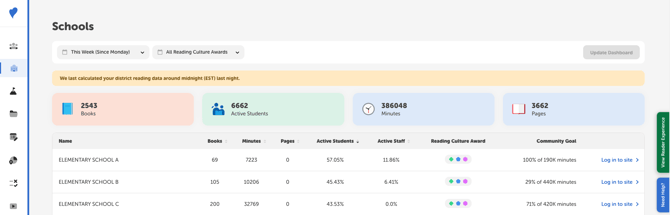
The district reading data displayed here syncs with all of your school sites every night, meaning that the data refreshes at about midnight ET to capture logged reading from the previous day.*
-
To change your timeframe viewed: Click the dropdown in the top left of the page to change the data timeframe. You can select This Week (Since Monday), This Month (Since the 1st), This Year (Since January 1st), or This Academic Year (Since August 1st). Then click “Update Dashboard” to refresh your data.
-
To filter by level of engagement: Click the dropdown in the top left of the page to filter by the Reading Culture Award earned. You can view all schools with “All Reading Culture Awards” or view a selection of schools based on their status as Trailblazers, Pathfinders, Igniters, Newcomers. Then click “Update Dashboard” to refresh your data.
-
To sort your schools list: Click the arrow to the right of the different headers (Total Books, Total Minutes, Active Students, etc.) to sort your schools list in ascending or descending order for that metric.
-
To view a specific school site: Click the “Log in to site >” link to the right of that school’s data to view that school’s admin dashboard just like their media specialists do. From there, you can get specific student or roster information, manage their challenges, and view school leaderboards, reports, and insights.
*The data displayed here updates at different times than the data on individual school sites. Because these values are calculated and cached, or saved, at various times throughout the day, the data on district and school dashboards may not align (depending on the timeframe selected and time when you access the data). If you need real-time data points, check out your District Reports section.