
To learn more about challenges, including setup and badges, visit Beanstack for Everyone.
You make an ongoing challenge that’s always available for readers. We recommend making 1,000 Books Before Kindergarten challenges ongoing, as well as other long-running challenges like 100 Books Before College.
Note: This cannot be done for reading list challenges or bingo card challenges. Those require start and end dates.
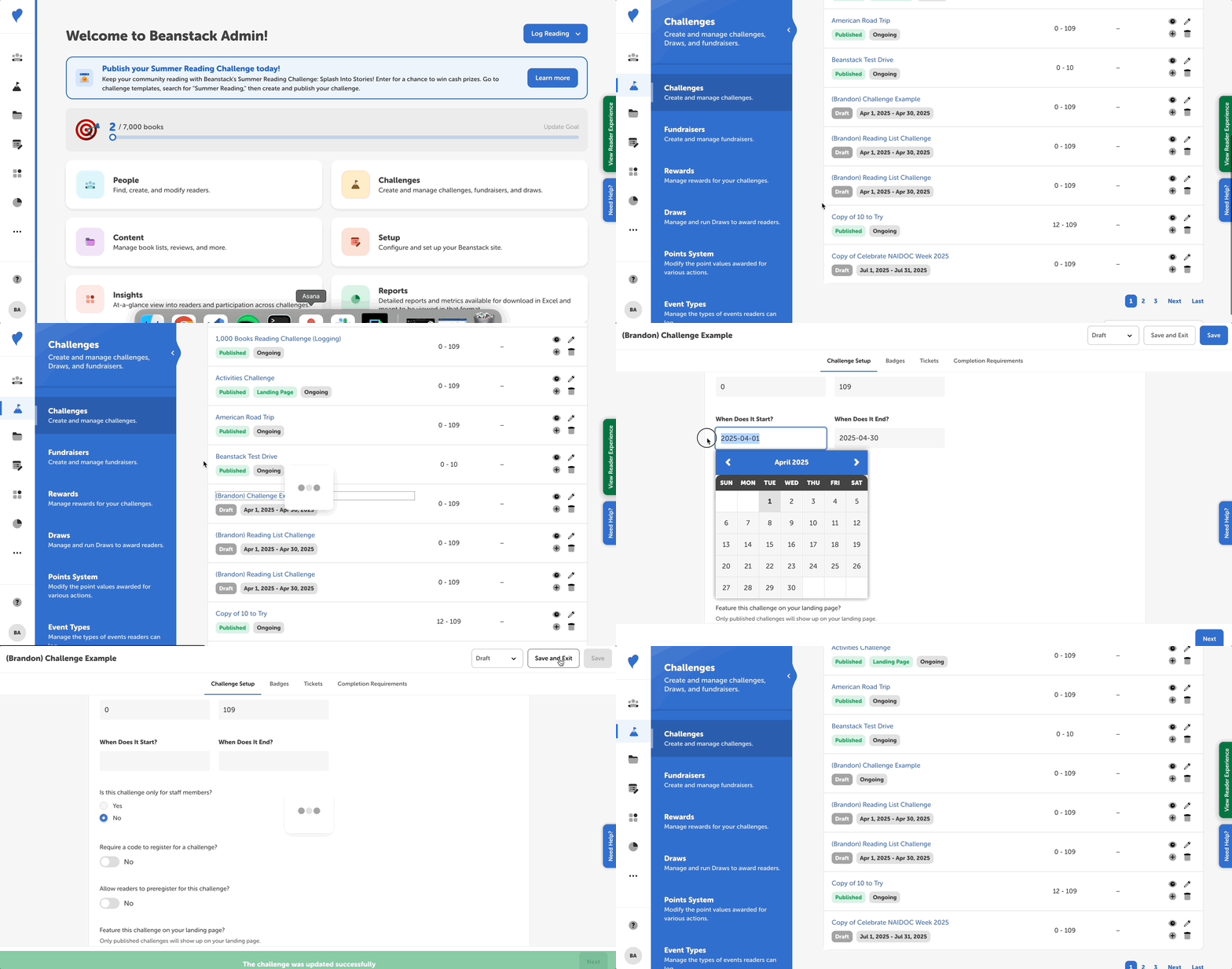
Follow the steps below to make a challenge ongoing:
- Log in to the admin view of your site.
- Go to Challenges.
- Either create a new challenge by clicking “Create Challenge” OR edit a challenge draft from the “All Challenges” list.
- On the “Challenge Setup” tab, scroll down to “Challenge Availability” to find the “When Does It Start?” and “When Does It End?” fields.
- Remove any dates from these fields. Otherwise, leave them blank.
- Click “Save” or “Save and Exit.”
On the “All Challenges” list, you’ll see a label under your edited challenge that reads “Ongoing.”
Note: As of March 27, 2021, all ongoing challenges count reading logged from the date on which readers enrolled in the challenge until readers complete or age out of the challenge. They will not count reading logged prior to enrollment in the ongoing challenge.