

Tags: Challenges
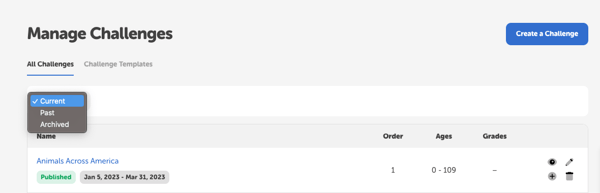
You can access all your current, past, and archived challenges by logging in to your site's admin dashboard and navigating to Challenges. Within the “All Challenges” tab, there is a dropdown for you to switch between “Current,” “Past,” and “Archived.”
-
Current: This selection displays challenges with current dates or that are ongoing, i.e., without a start and end date. Admins can edit, preview, duplicate, or delete any of these challenges. We strongly recommend against editing or deleting public current challenges.
-
Past: You can find all your recently ended challenges here. Library admins and media specialists plus are able to edit, preview, duplicate, or delete any of these challenges. Keep in mind that we strongly counsel against editing and reusing a past challenge, and instead recommend duplicating and editing a past challenge if you’d like to offer it again.
-
Archived: Any challenges that ended more than 60 days ago will be automatically archived and become uneditable. Library admins and media specialists plus can still preview, duplicate, or delete any of these challenges. In order to duplicate an archived challenge and bring the cloned challenge back into your current challenges, be sure to edit the dates so they are current before saving the challenge.