

Tags: Classes & Readers, Staff
Teachers, Media Specialists, and Media Specialist Plus users can verify or freeze the accounts of their rostered students. These actions help manage student participation effectively and maintain reading integrity. Verifying a reader allows voracious readers to exceed school logging limits while freezing a reader’s account helps educators address issues with repeated inaccurate or dishonest logging.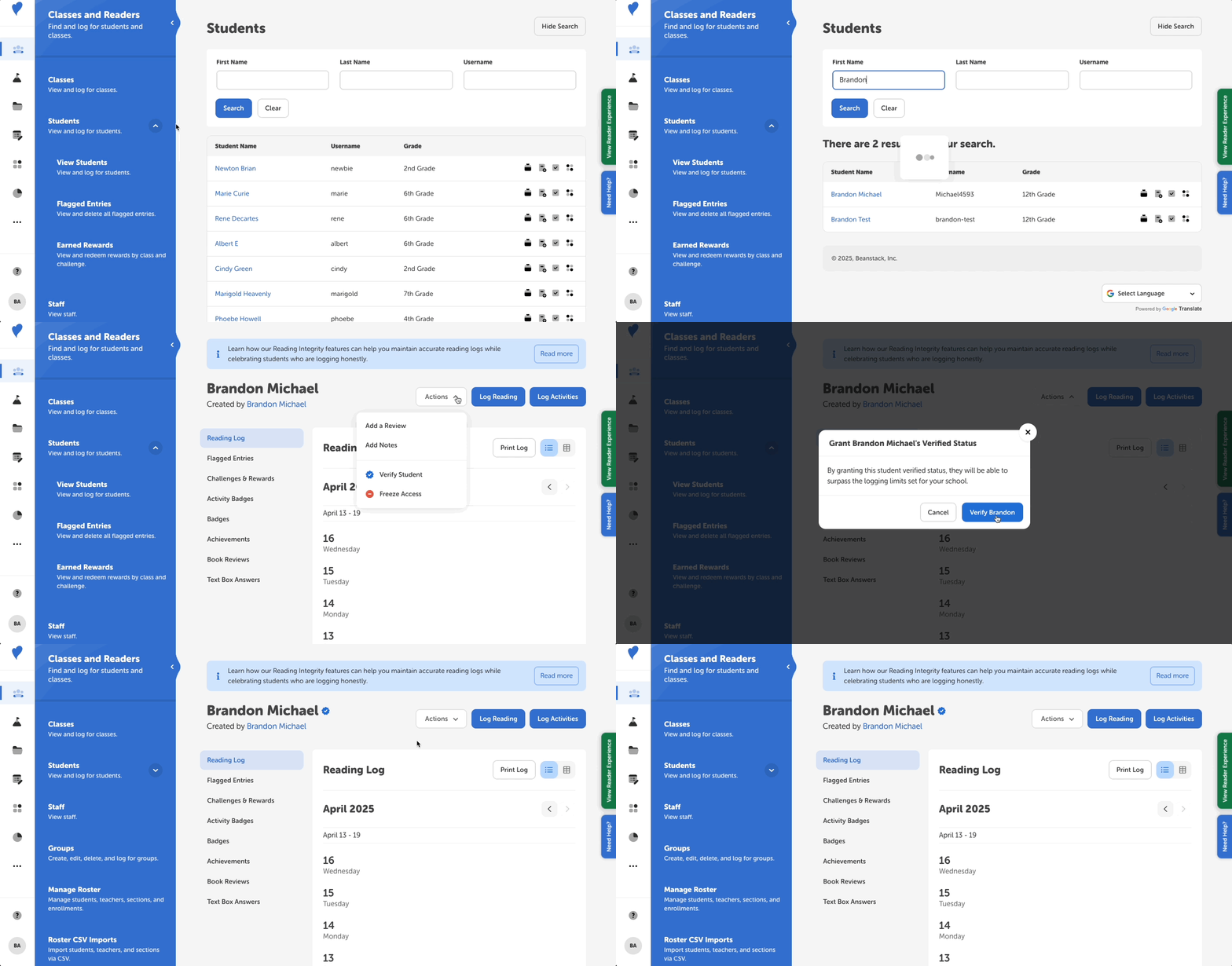
Verifying a Student
Freezing a Student’s Account
How does verifying or freezing a student impact their experience?
Verifying a Student
-
From your admin dashboard, navigate to the student’s profile via Classes and Readers > Students > View Students.
-
Search for and select the student’s name to view their profile.
-
On the student’s profile, click Actions and select Verify Student from the dropdown menu.
-
In the confirmation modal, click “Verify.” The student is now verified.
You can unverify a student at any time by following the same steps above and then selecting “Unverify Student” in the actions menu.
Note: A verified student remains verified year-over-year so long as they remain at the same school. But if they change schools, the student would be need to be re-verified at the new school.
Freezing a Student’s Account
-
From your admin dashboard, navigate to the student’s profile via Classes and Readers > Students > View Students.
-
Search for and select the student’s name to view their profile.
-
On the student’s profile, click Actions and select Freeze Access from the dropdown menu.
-
In the confirmation modal, click “Freeze.” The student’s account will be frozen for the next 10 days.
You can unfreeze a student’s access at any time during the 10-day freeze period by following the same steps above and then selecting “Unfreeze Access” in the actions menu.
Note: The 10-day freeze period is based on the time at which the account was frozen. If a student's access was frozen on August 1 at 9:00a.m., they will regain access on August 11 at 9:00a.m.
How does verifying or freezing a student impact their experience?
-
Verified Readers:
-
See a blue verified icon next to their profile name in the web platform
-
Can surpass their school’s log and daily limits on both the web and mobile platforms
-
-
Frozen Readers:
-
See a message when signing in on the web platform that informs them their account is frozen
-
Cannot log reading on the mobile application (however teachers and admins can still log on their behalf)
-
-
Other Readers:
-
See the blue verified icon next to any verified reader’s name in their Friends page
-
See the blue verified icon next to any verified readers name in the Friends Leaderboard
-
Cannot see if a reader has been frozen
-
Cannot surpass their school’s log or daily limits
-
Note: Unless set otherwise, there is a 600-minute logging limit for all readers (including verified readers and admins).