

Tags: Reading Integrity
Our unique suite of reading integrity features takes a creative approach to accountability—one that doesn’t use quizzes or require extensive review or grading by educators. We’ve drawn on our expertise, data, and industry research to create a set of tools that help schools ensure honest logging while preserving students’ reading independence.
We know that the best way to combat fraudulent logging is to talk to your students. Our simple yet effective system provides clear, actionable insights, allowing you to focus your energy on students, rather than combing through data.
The Reading Integrity Suite includes:
-
Take a Closer Look System - automatically flags entries that could indicate fraudulent logs
-
Student Verification System - allows educators to celebrate voracious readers and freeze access for students logging dishonestly
-
Reading Integrity Settings - provides customizable settings, warning levels, and logging limits
-
Book Talks with Benny - a Premium feature that allows students to chat with Benny, our bean-shaped teacher and librarians assistant
Take a Closer Look System
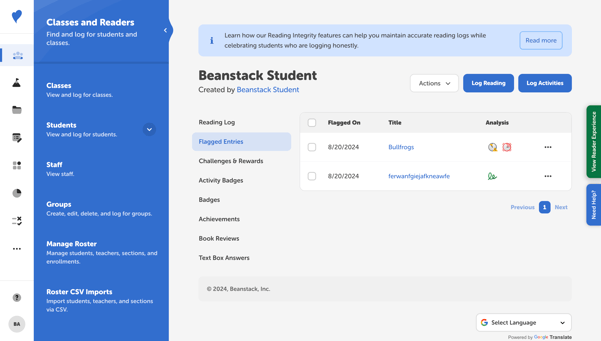 Our proprietary system automatically flags log entries for later review, based on specific criteria to prevent fraudulent logging and ensure that reading logs accurately reflect students’ reading activities. Here are the main reasons entries might be flagged:
-
Title Length
.png?width=24&height=24&name=image%20(5).png)
-
Logs with titles significantly shorter than 3 characters or exceptionally longer than usual.
-
-
Gibberish Title
-1.png?width=24&height=24&name=image%20(6)-1.png)
-
Logs with non-sensical titles, excessive characters, or those resembling gibberish.
-
-
Inappropriate Title
-2.png?width=24&height=24&name=image%20(3)-2.png)
-
Logs with titles that contain inappropriate language.
-
-
Close to Limit
.png?width=24&height=24&name=image%20(7).png)
-
Logs that are very close to the site’s logging limit.
-
-
Close to Warning Level
-3.png?width=24&height=24&name=image%20(4)-3.png)
-
Logs that are very close to the site’s warning level.
-
-
Exceeded Warning
-2.png?width=24&height=24&name=image%20(8)-2.png)
-
Logs exceeding the site’s warning level for logging amounts.
-
This proactive approach helps educators uphold a culture of reading integrity to ensure an enriching reading experience for all users. After they “take a closer look,” administrators can “unflag” a log to remove the flag, edit a log, or delete it entirely.
If we’ve missed any cases, please complete this brief survey to help us improve Beanstack.
Student Verification System
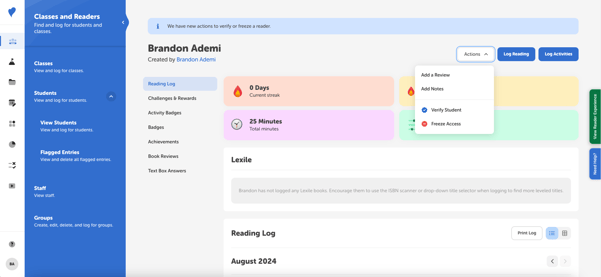 Verifying and Freezing readers helps manage student participation and maintain reading integrity. Verifying a reader allows voracious readers to exceed school logging limits, while freezing a reader’s account helps you address issues with dishonest logging.
-
Verifying a Reader: Admins can confirm that a student’s logging activity is honest and allow them to log above a school’s logging limits. When verified, a blue checkmark is displayed next to the student’s name in Beanstack—this is a great way to celebrate your most active readers!
-
Freezing a Reader: Freezing a reader’s account temporarily restricts their access to Beanstack for 10 days. During the freeze period, students will see a message explaining that their account has been frozen and they are not able to log reading at this time. Admins can unfreeze an account at any time.
To learn more about how to verify or freeze a user’s access, check out this article.
Reading Integrity Settings
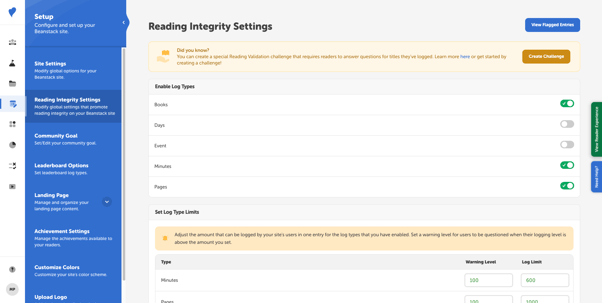 Adding logging limits and warnings to your site is the simplest way to promote honest logging. Each school sets their own limits, and students are required to promise that their reading is honest when they log above that threshold. Other settings include requiring a book title when students log and restricting logging to the past 90 days.
To learn more about the settings available, check out this article.
Book Talks with Benny
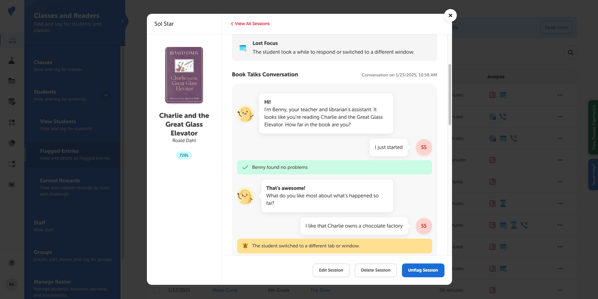 Book Talks with Benny is a feature for schools with a Premium Beanstack subscription only. When students log at or above their site’s log warning level, Benny will start a conversation with the student about their current book. Once a student has ended a conversation with Benny, it can be later reviewed in Classes and Readers > Students > Book Talks and Flagged Sessionsby a teacher or school admin.
Please note that Benny will only appear for a student if:
-
The student is in grade 2 and above.
-
The student is not verified.
-
Your school or district has opted-in to Book Talks and the setting is ON. If you are unsure of this, please reach out to your Client Success Manager.
To learn more, check out these articles, which includes answers to Frequently Asked Questions.