
Tags: Staff, Media Specialists, Libraries, Logging, Setup, Web
Admins can streamline their reader’s logging experience by combining minutes and books into a single logging option on the web.
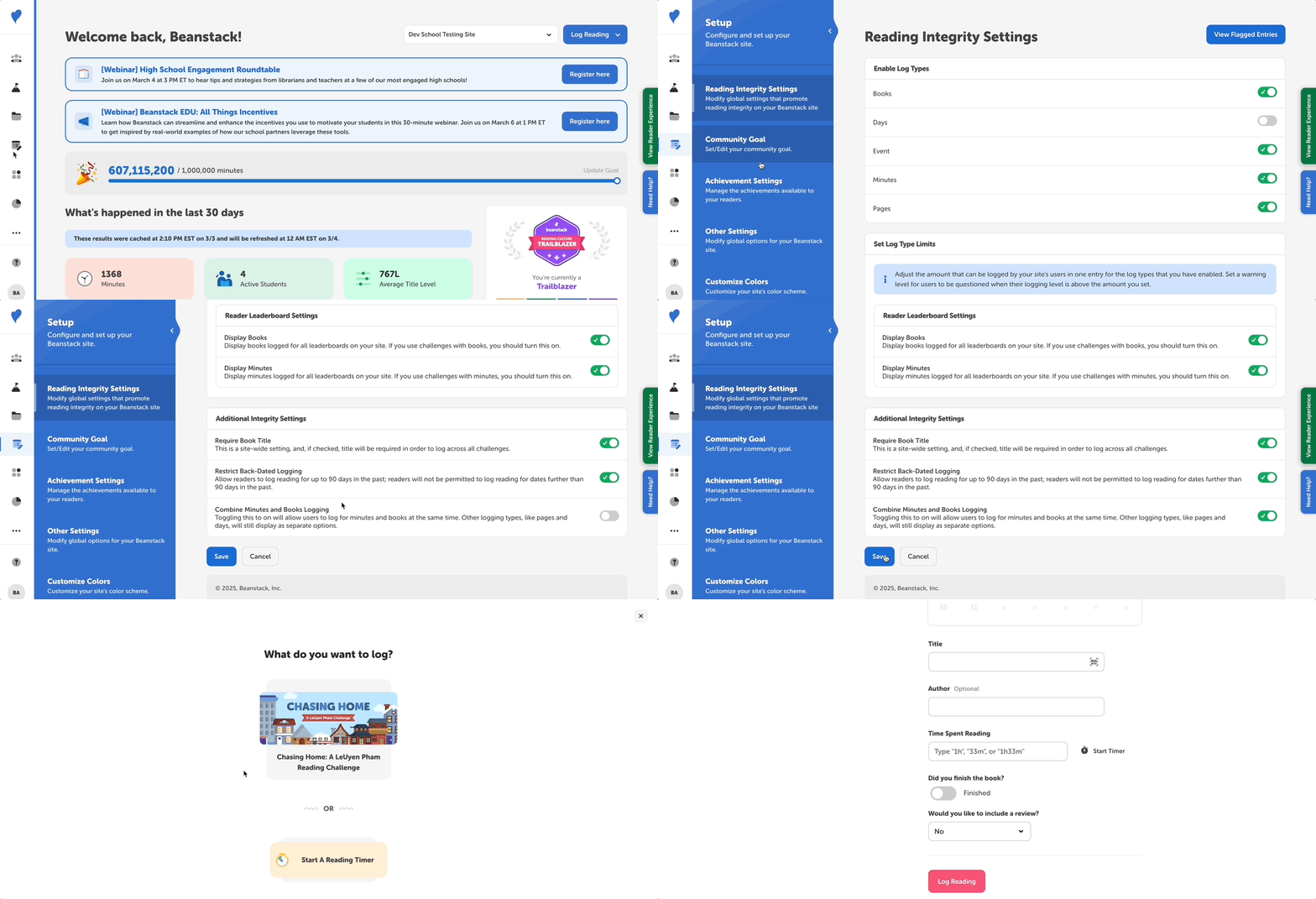
When this setting is turned on, readers will see a “Log Reading” option that lets them log both their minutes and books all at once.
Note: Only media specialists plus and library admins can this and other site settings.
-
Log into your site with your school admin credentials.
-
In the dashboard, select “Setup”, then:
-
For schools, go to “Reading Integrity Settings.”
-
For libraries go to “Logging Settings.”
-
-
Scroll down to the “Additional Integrity Settings” section.
-
Toggle on the “Combine Minutes and Books Logging” option.
-
Select “Save.”
You can test this feature by switching into the Reader Experience and selecting “Log Reading” near the top-left. There, you’ll find a “Log Reading” option that brings up a form for entering minutes and book data for a reading session.
Note: Turning on combined logging also changes the look of the logging form on the web, but not the mobile app. Learn more about this here.