
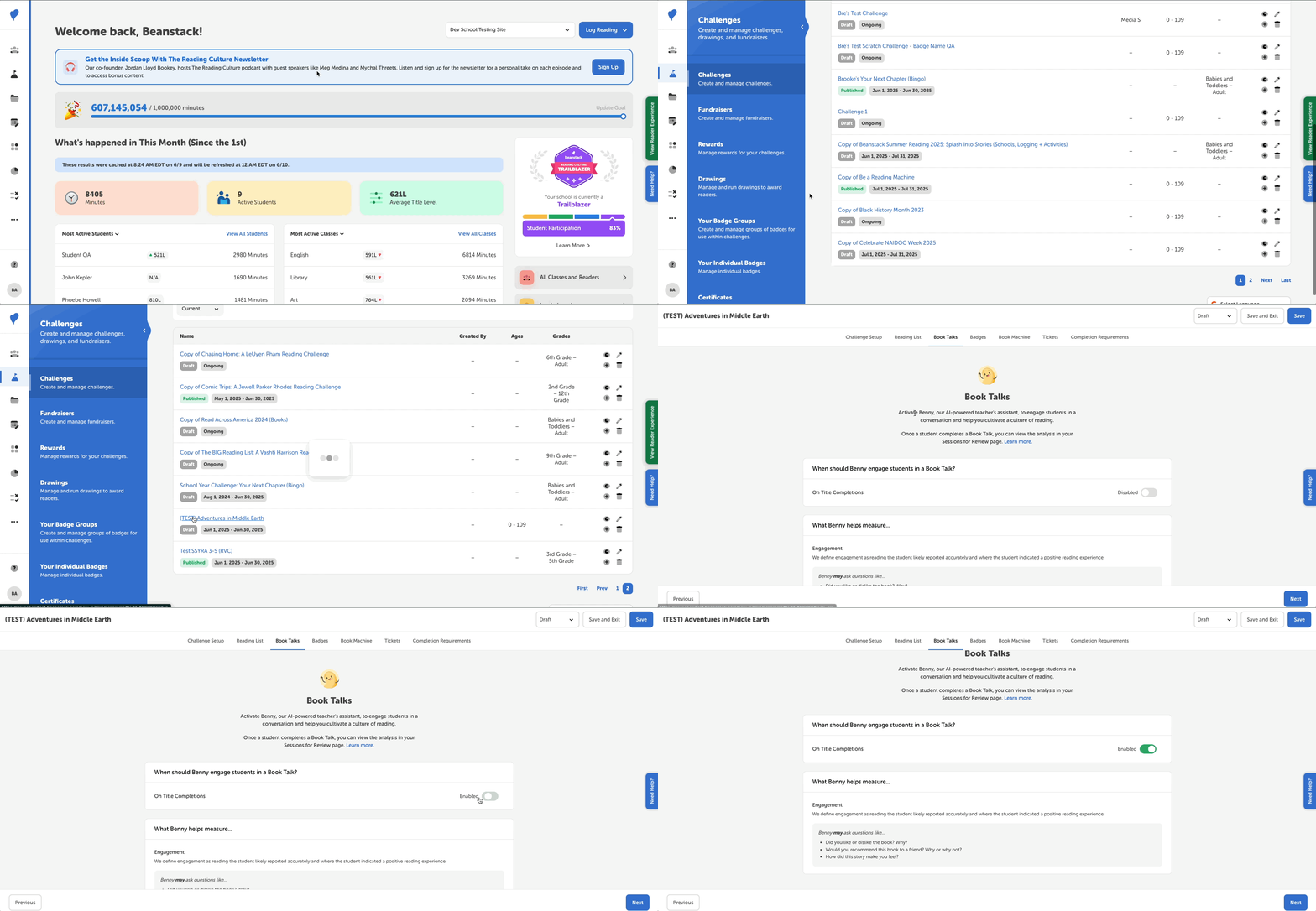
While setting up most challenges, you can enable Book Talks with Benny to take place when a student finishes a book when logging for the challenge. This feature is currently available to just school clients, and only applies to log-based challenges that include minutes or books as log types.
Note: Both verified and non-verified students in grades 3+ can trigger a Book Talk with Benny when participating in the challenge.
Follow the steps below to add Book Talks to your challenge:
- Log in to the admin view of your school site.
- Navigate to Challenges.
- Either create a new challenge by clicking “Create a Challenge” or select the challenge draft you’d like to edit.
- Select the “Book Talks” tab.
- Toggle the “On Title Completions” setting under “When should Benny engage students in a Book Talk?”
You’ve now enabled Book Talks with Benny for your challenge! After your students log a book as complete in a Benny-enabled challenge, our AI-powered teacher’s assistant will initiate a fun, age-appropriate conversation about what they read! Staff and teachers can then review these sessions on the admin view.
A few things to note:
- Benny will still appear for non-verified students who log above the limits set on their site.
- By default, your school site is limited to 5,000 conversations per year. You can track how many conversations have been used thus far by going to Setup > Book Talks Usage.
- If pages are turned on as a log type, Benny will appear for non-verified students who log above the limits set on their site.