

Tags: Classes & Readers, Staff, Media Specialists
 Note: Only staff members with district admin or media special plus roles may update staff roles.
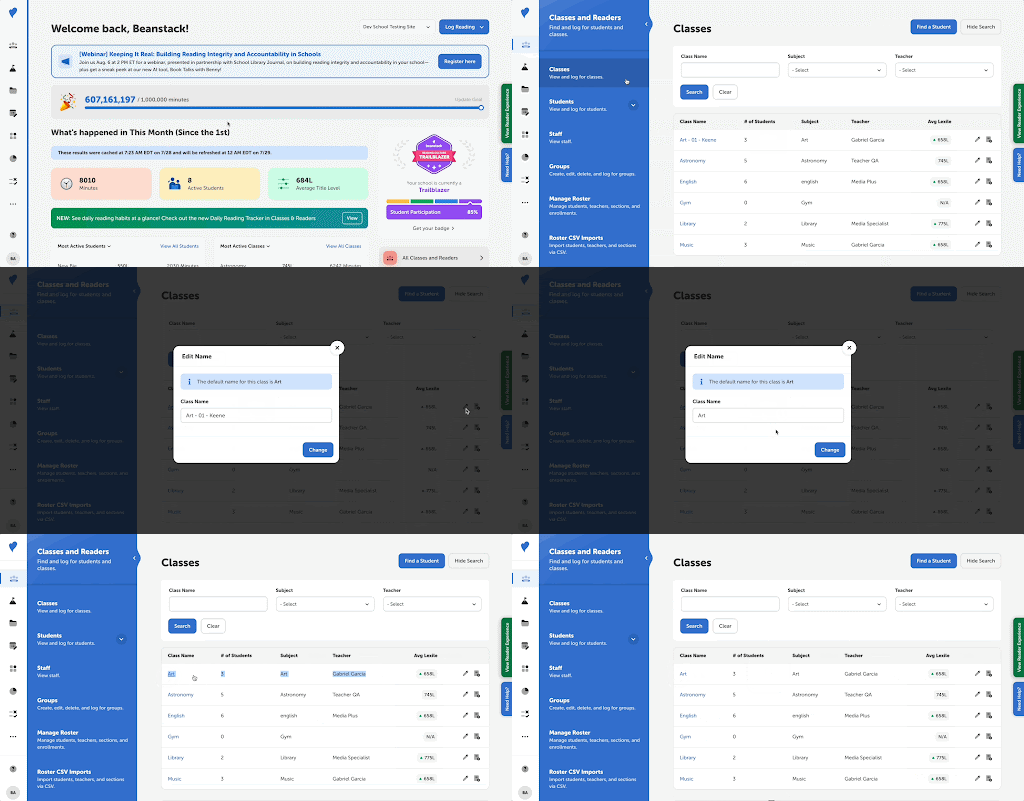
As a school admin, you can now edit your class names on your Beanstack site. This gives you more ownership over your roster data on Beanstack, makes your class more searchable, and lets you get straight to inspiring a culture of reading at your school!
Schools
- Navigate to Classes and Readers > Classes.
- Click the pencil icon to the right of the class’s current name.
- Edit the name and click “Change.”
Districts
- Navigate to Setup > Classes.
- Select from one of the following:
- Default (as provided by rostering)
- Enhanced (original + teacher + period)