

Tags: Classes & Readers, Staff, Reading Integrity
It is now easy for teachers and admins to track their class’s daily reading habits on their school site.
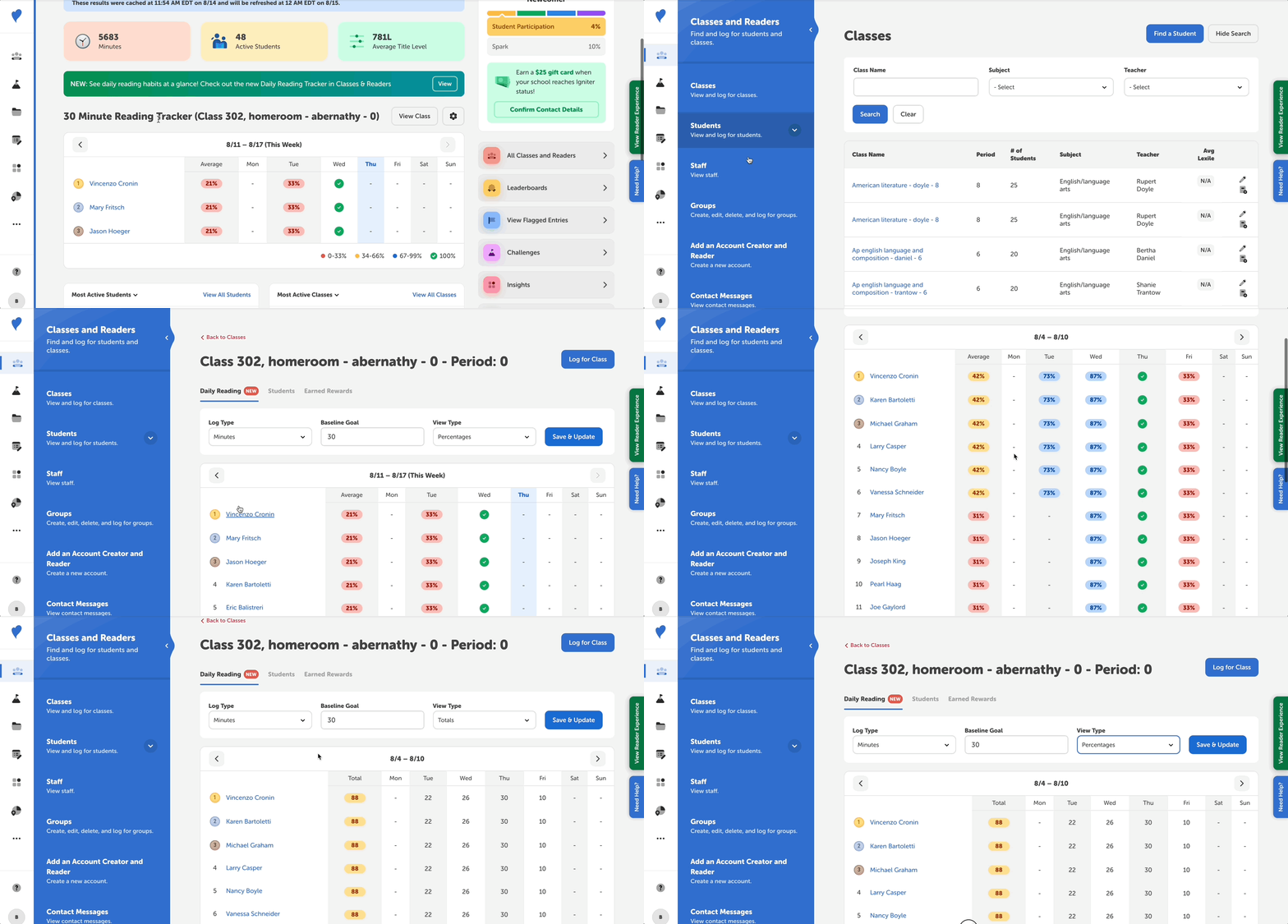
Follow the steps below:
-
Log in to the admin view of your school site.
-
Navigate to Classes and Readers > Classes.
-
Select the class you’d like to view daily reading for.
-
Go to the “Daily Reading” tab.
You’ll see a table showing a weekly breakdown of each student’s daily reading progress for a given class. In addition to setting a baseline goal in minutes or pages, you can set the log type and toggle between totals or percentages.
Here’s the a breakdown of the percentages on the tracker:
-
✅ (Green) - 100% of the baseline goal was read by the student.
-
🔵 (Blue) - 67%-99% of the baseline goal was read by the student.
-
🟡 (Yellow) - 34%-66% of the baseline goal was read by the student.
-
🔴 (Red) - 0%-33% of the baseline goal was read by the student.
Note: Totals and averages are calculated for each individual student and the class overall. Keep in mind, the totals for the previous day are calculated overnight.
Back on the home screen, you’ll see a smaller version of the daily reading tracker displayed! There, you can see data for the last class you viewed. You can also customize how the data is displayed from here, and click “View Class” for more details.