

Tags: Libraries, Staff Actions, Challenges
Note: This is a permanent action and cannot be reversed. Once someone has completed a challenge, you will not be able to un-enroll them or un-complete it for them.
On your site, you may be able to mark an entire group as having completed a challenge. If you do not have that option, please submit a support ticket to have our team enable this on your site. Keep in mind that simply marking a challenge as complete for a group does not add the required logged reading, activities, or reviews set by the challenge's completion requirements to the group’s log, but simply marks the group as complete in your data and awards them any applicable completion badges and rewards.
To mark an entire group as having completed a challenge, follow the instructions below:
-
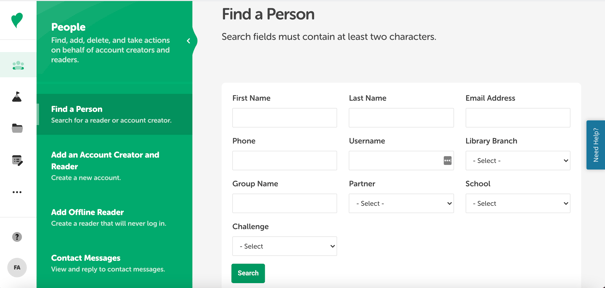
Log in in to the administrative view and select People > Find a Person.
-
Enter the group name and click “Search.”
-
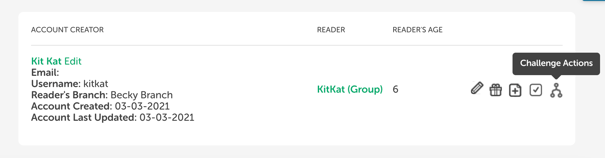
Click the quick-action Challenge Actions icon to the far right of the group name.
-
Click the empty “Completed?” box next to the desired challenge.
-
A warning message will pop up. You must confirm that you wish to complete the challenge on behalf of the reader and that you understand the action is irreversible. If you wish to proceed, check both boxes and click “Permanently Complete This Challenge.” Please note: Once you mark a challenge as complete, it cannot be undone!