

Tags: Events, Content, Events & Announcements, Announcements, Lubraries
Managing announcements is not available on school sites. For more content information, visit Beanstack for Everyone
Announcements are available to all premium-level library sites. They are short messages sent to all Beanstack account creators via their weekly or bi-weekly recommendation emails.
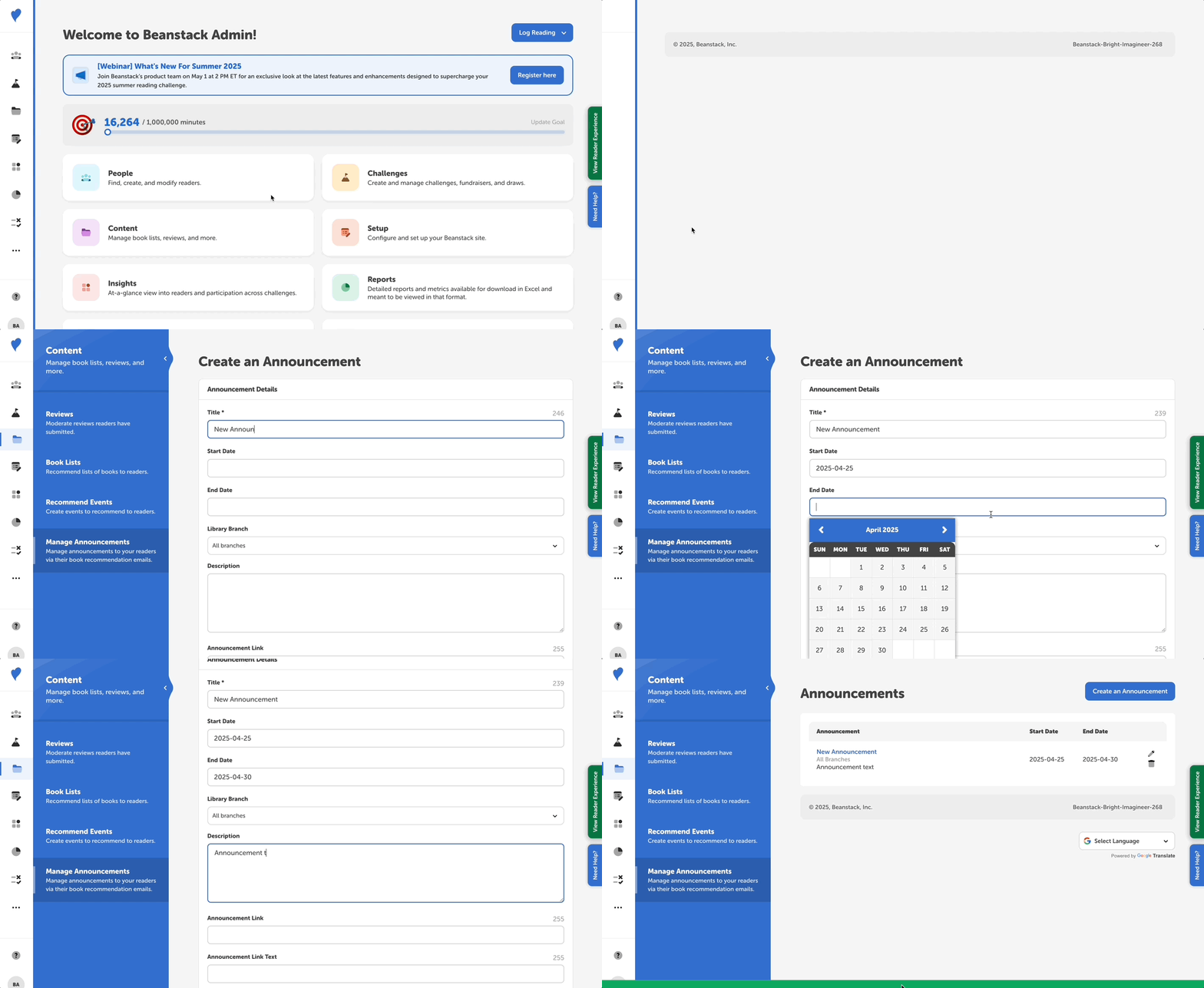
Follow the steps below to add announcements to weekly or bi-weekly emails:
-
Log in to the admin view of your site.
-
Go to Content > Manage Announcements.
-
Click “Create an Announcement.”
-
Populate the following fields:
-
Title: Header Text
-
Start/End Dates: This is the date on which an announcement will start/end being included in reader emails.
-
Branch: If you only want a message to go out to readers at a particular branch, select branch.
-
Note: If you do not require branch as a registration field, people who did not select a branch would not receive messages intended for a particular branch.
-
-
Description: This is the text that will go below the bolded header text.
-
Announcement link: If you want to link to additional information, you may add a link here.
-
Announcement link text: There will be a button that links to the link you add.
-
-
Click “Create.”
You’ll then be brought back to the previous screen, where you can edit or remove a created announcement.