

Tags: Groups, Libraries, Readers
Creating a group allows you to log reading for five or more readers together, and can be particularly handy for daycares, summer camps, and the like. Setting up the group to log “all at one time” allows the account creator to input one reading session for all readers within that group; conversely, setting up the group to log “individually” means the account creator will log for each reader separately. A group set up to log all at one time can only include one age/grade, so that the readers all progress through the same challenge(s) together.
If a group wants to log all at once, but the group members are different ages, we recommend creating multiple groups for each age/grade. In this scenario, there would be one account creator with one username who is responsible for signing in and logging reading, and multiple groups (of different ages) under that account.
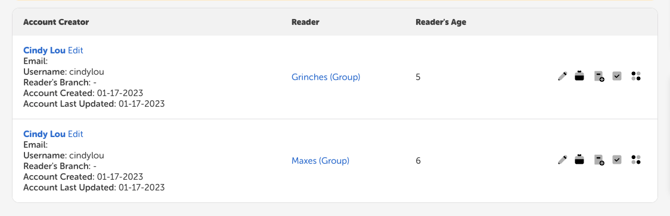
For example, an account creator could set up two groups, one for 5-year-olds and one for 6-year-olds, and enroll each group in the available challenge(s). Each group will automatically be created to log all at once. For more information on registering a group from the admin view, read this article. For steps on registering a group from the reader view, check out this article.
The account creator or a library staff member can continue following those steps until all groups, for all ages/grades, have been added.
Note: Keep in mind that a family or individual account cannot add groups; only an account creator set up with groups already can add new groups to their account. If you do not see the option to “Add Group” within an account, it was likely set up as an individual or family account, and you’ll need to create a new group account for group logging.