

Tags: Libraries, Staff Actions
Do you want to transfer reader(s) from one account to another? You may want to do this if a child moves from one daycare group to another, a parent wants to move a teen into or out of their family account, or any other number of reasons.
Note: You can only transfer a reader into or out of existing accounts within your library’s Beanstack site. This process may take up to 24 hours to complete.
Follow the steps below:
-
Log in to the admin view of your library site.
-
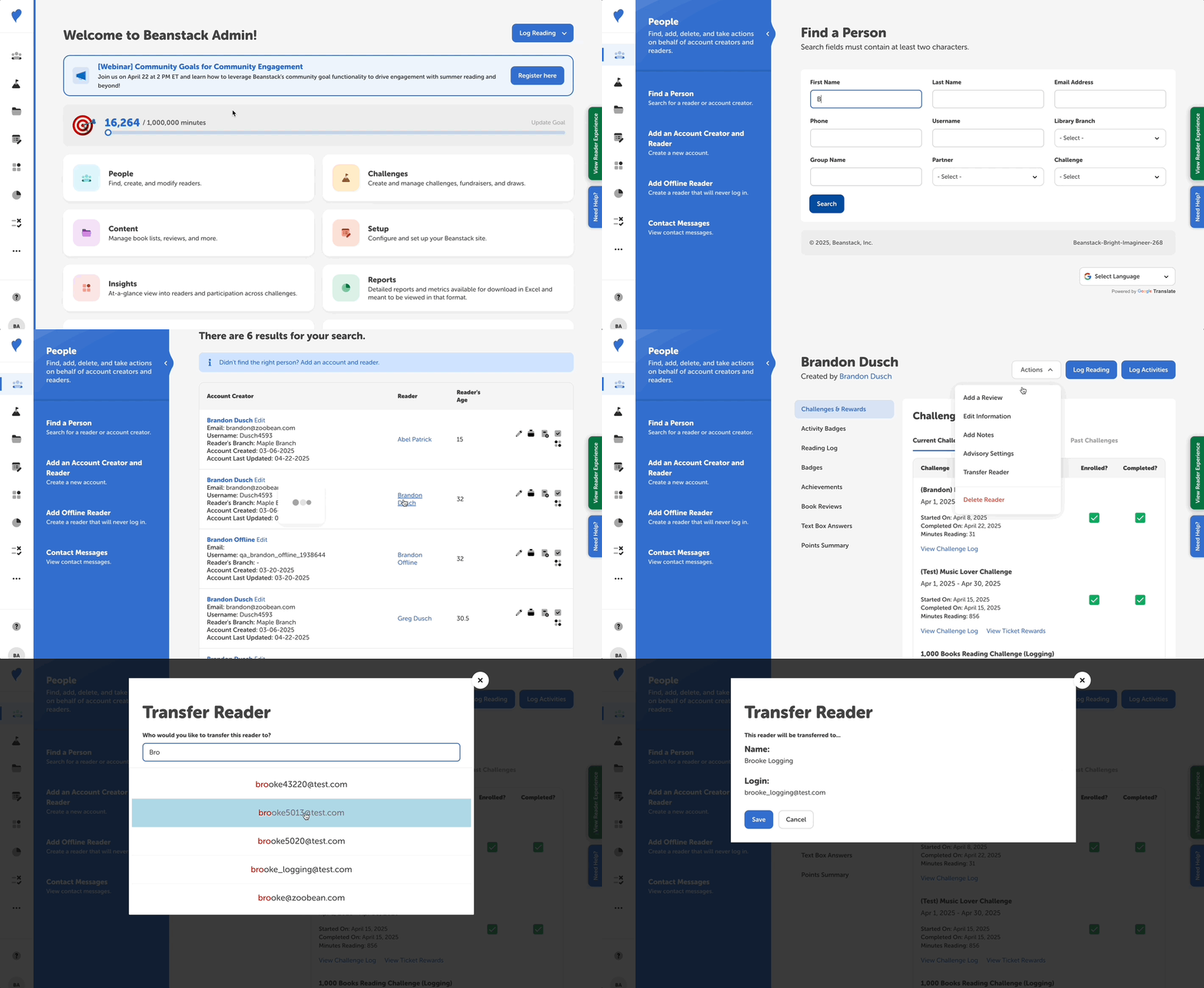
Navigate to People > Find a Person.
-
Use the search fields to find the reader you’re looking for.
-
Click the reader name in the “Reader” column.
-
From the reader’s profile page, click the “Actions” button and then select “Transfer Reader” from the dropdown menu.
-
A pop-up window will prompt you to enter the email address or phone number from the existing account to which you’d like to add the selected reader.
-
The email address or phone number options will populate as you type. Select the accurate one or, if there isn’t an account created yet, close out and create the account before following the above steps again.
-
-
Once you’ve verified that the correct account is selected, click “Save” and that reader will be transferred.
Note: Within the reader view, there is also an option for an account creator to share a reader with another account creator. This is helpful in many situations. For example, a nanny wants to share a reader with the child’s parents, a teacher wants to share with a parent, divorced parents want to share with one another. You can learn more about sharing readers from the reader experience here.