

Tags: Donations & Sponsorship, Fundraisers
Media specialists plus and library administrators can manually enter check or cash donations to count toward their overall reading fundraiser goal and toward individual readers’ fundraising by following the steps below.
-
Log in to the admin page of your site.
-
Navigate to Challenges > Fundraisers, and select the current published fundraiser. You can only add cash donations when a fundraiser is live!
-
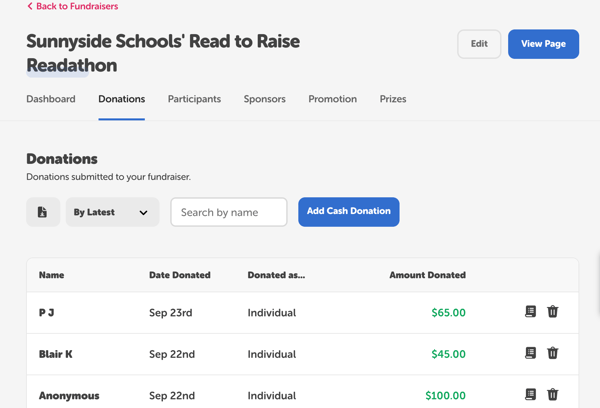
From within the fundraiser dashboard, click the Donations tab and then click “Add Cash Donation.”
-
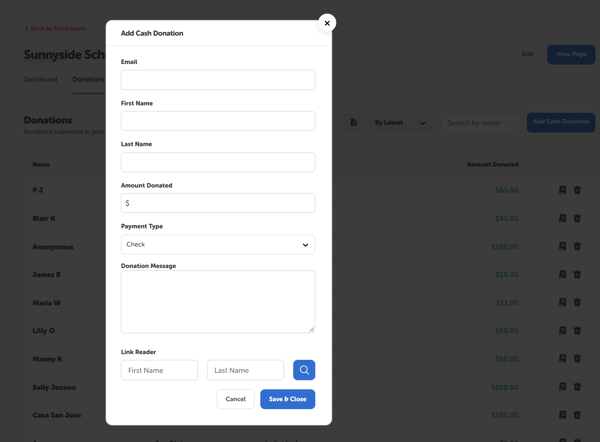
A modal will pop-up where you can fill in the donor details, the amount donated, the payment type, and any applicable donation message.
-
Set the payment type to “Cash” or “Check.” Unlike card donations, which are processed by Stripe, cash/check donations go directly to the library or school.
-
-
You can also link the donation to a specific reader in the Link Reader section by typing in their first and/or last name, clicking the search icon, and then selecting the relevant account.
-
Double check that the information is correct, as only the donation’s linked reader can be edited once added. Then, click “Save & Close” to add the donation to your fundraiser. Once it’s processed, it will show up on your community donation page and on the linked reader’s individual donation page.