
Tags: Challenges, Reading Lists, Setup
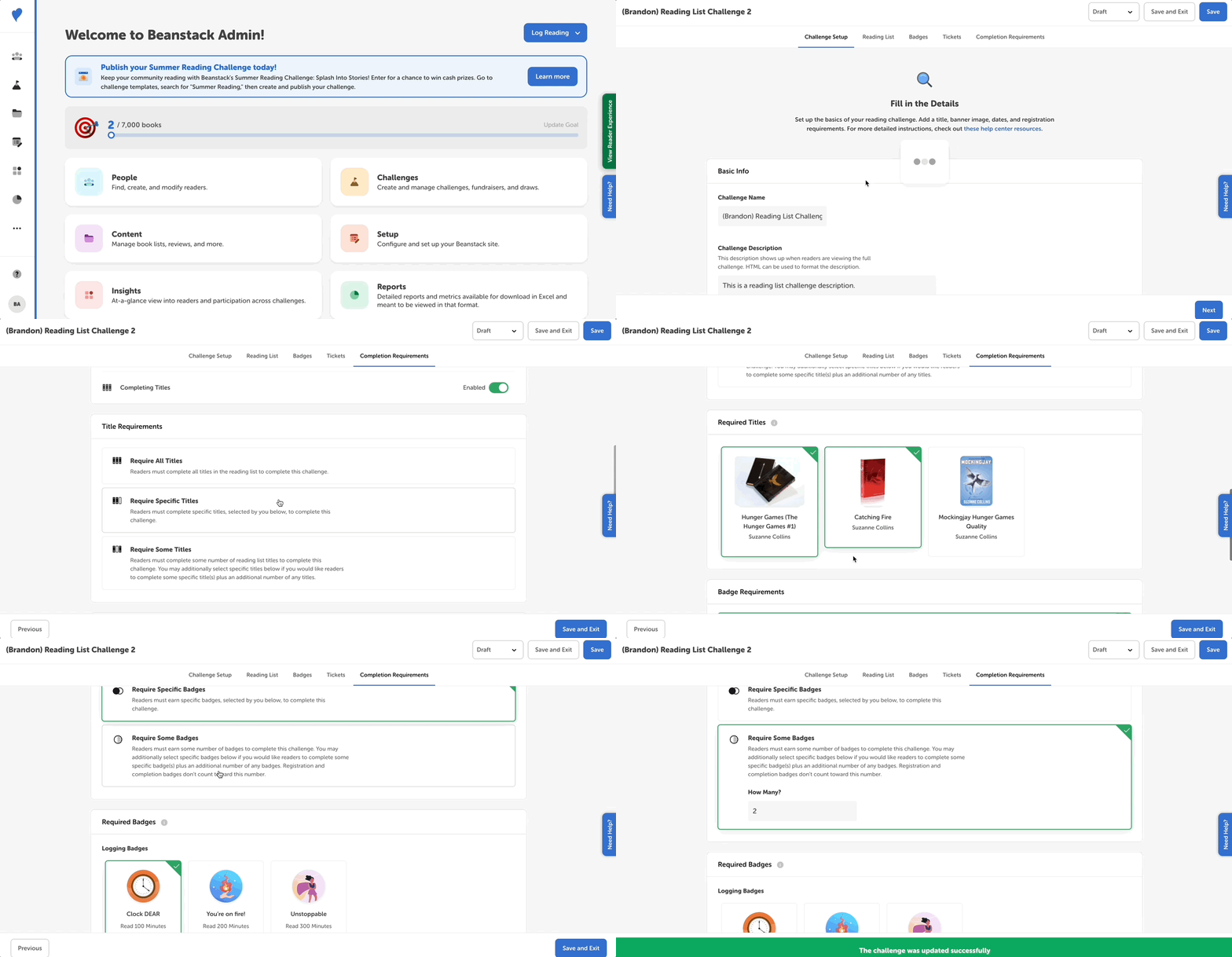
The final part of building a reading list challenge is determining the completion requirements. This is where you decide what badges are required to complete the challenge, and where you can also specify reading a certain number of titles or specific titles for completion.
-
Log in to the admin view of your site.
-
Navigate to Challenges and select a draft challenge.
-
Go to the “Completion Requirements” tab.
-
Toggle on the “Completing Titles” option if you want readers to be required to read a certain number of titles or certain specific titles in your reading list.
-
Select the “Require All Titles” option if readers must complete all titles in the reading list to complete the challenge.
-
Pick the “Require Specific Titles” option if readers must complete specific titles from the reading list, which you then select below. These required titles will be marked to readers on their challenge page’s reading list.
-
Select “Require Some Titles” if readers must complete a specific number of titles from the reading list, and then enter that number below. You can also click on specific titles if you want readers to have to read certain title(s) within the specified number of titles. The required titles and the total required number of titles will be displayed to readers on their challenge page’s reading list.
-
-
Proceed to set your badge completion requirements. If using book logging badges, make sure the number of required titles matches the number of required logging badges.
-
Click “Save.”