

Tags: Reports & Insights, Insights, Reports, Libraries
If you and your team use offline reader accounts to input paper logs, that data is included in all your reports just like it is for traditional readers that log reading for themselves. If you want to analyze data for just your offline readers, you can easily isolate and view that participation data using the “Offline Individual Reader Participation by Challenge” report.
-
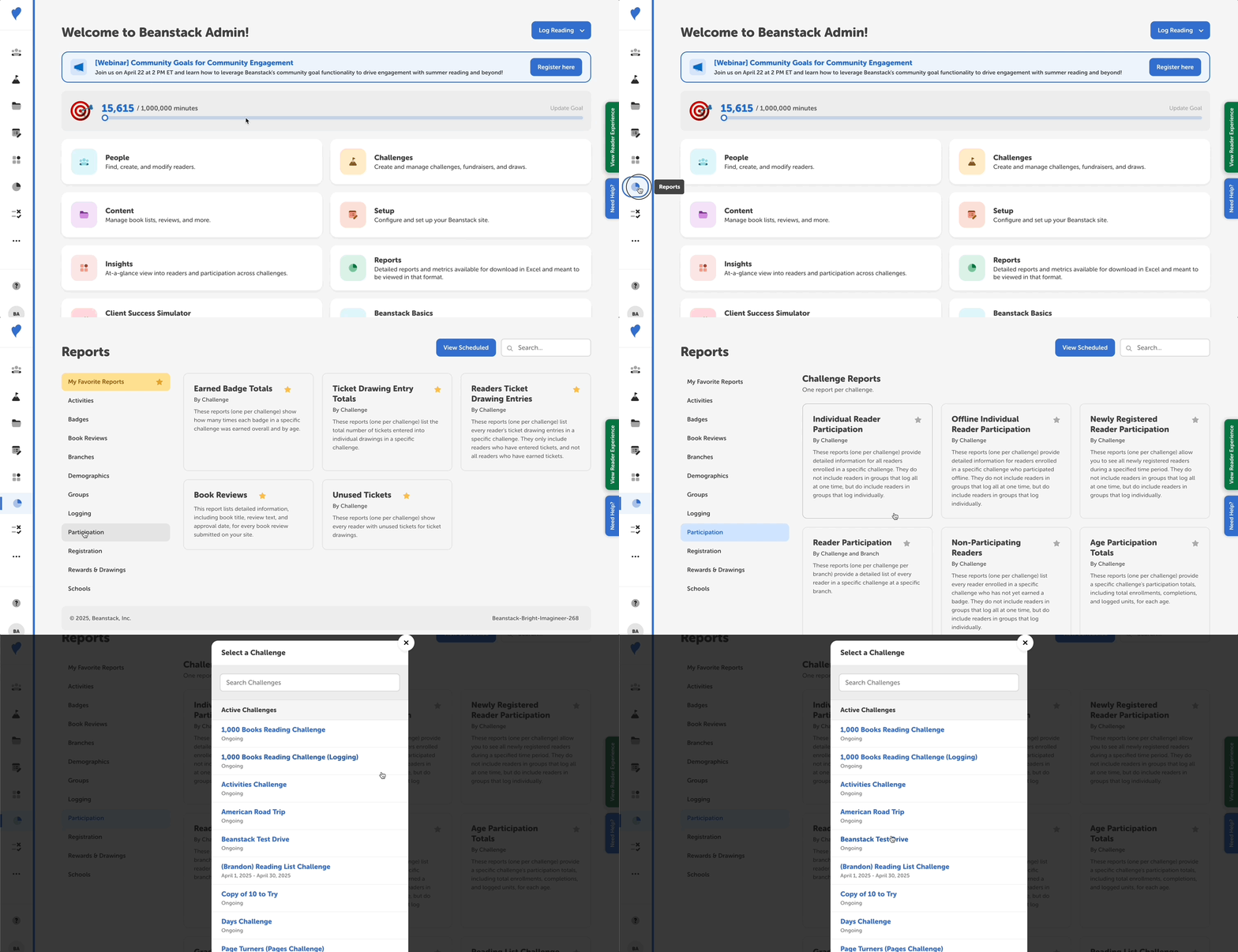
Log in to the admin view of your library site.
-
Navigate to Reports.
-
Search for the “Offline Individual Reader Participation by Challenge” report or click the “Participation” section to find it listed under “Challenge Reports.”
-
Select your desired challenge to view all the offline readers participating in it. You can add date restrictions, favorite the report, customize its columns, schedule the report, or download the data as needed.
Note: Offline readers are also included in the “Individual Reader Participation by Challenge” report if you want to view all your participation data! You can recognize offline readers in any report or in the Find A Person search on your site by their username. All offline reader accounts start with “qa_” and are generally followed by the reader’s first name, last name, and a three-digit number, all separated by underscores.