
Tags: Readers, Accounts
Note: Only library sites allow users to upload custom profile images. School sites do not currently have this feature.
Readers can choose to update their profile avatar on Beanstack, which defaults to display their initials, to a custom image of their choice. The profile image is visible on their friend card, on leaderboards, and on their individual donation page during an active reading fundraiser.
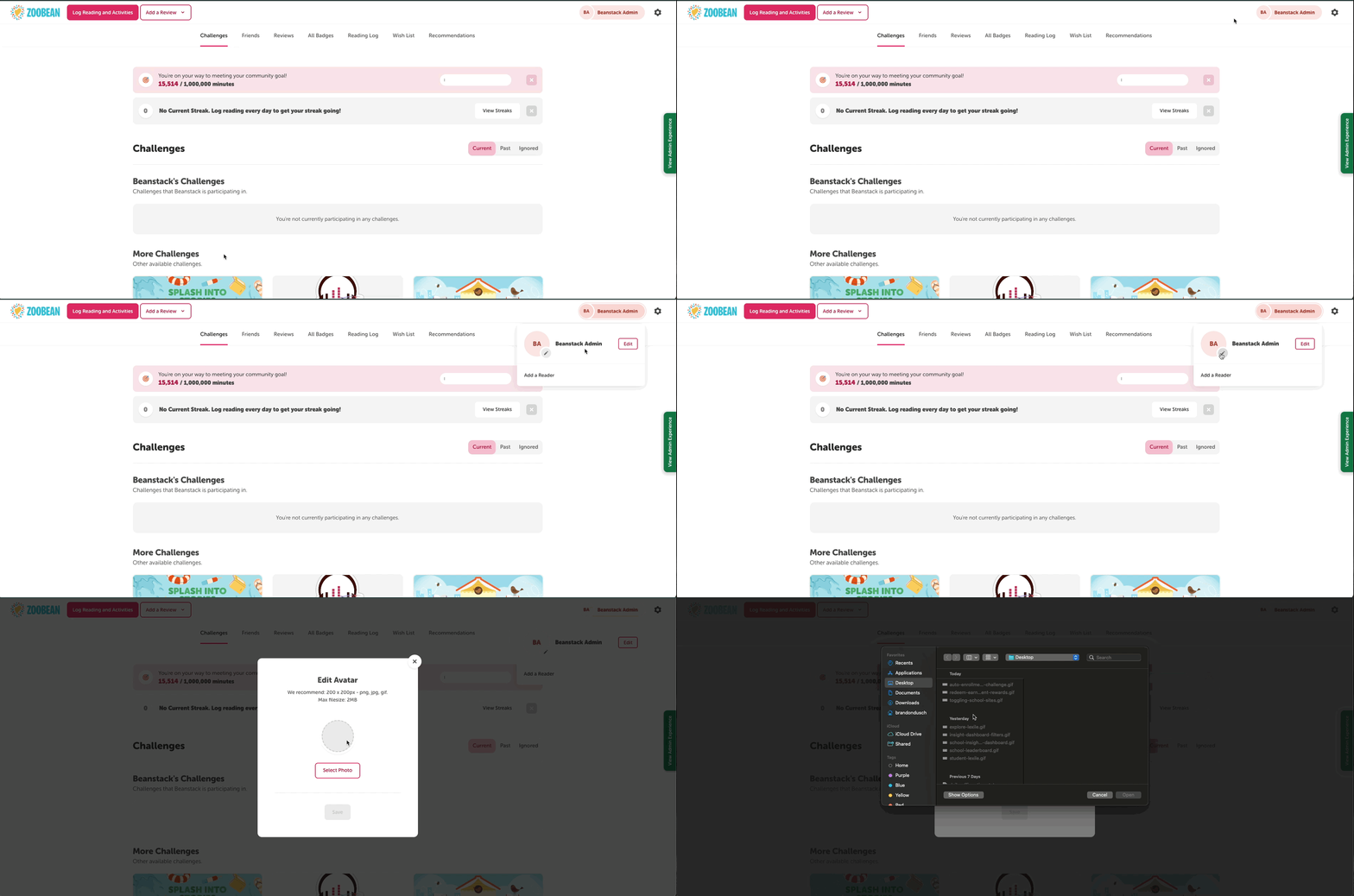
Once logged in on the web, individual readers can follow the steps below to upload a new profile image.
-
Click the reader name in the upper righthand corner of the screen, and then click the pencil icon in the corner of the default profile image of the reader’s initials.
-
Note: On an account with multiple readers, you will need to toggle over to the desired reader first by clicking their name before the pencil icon becomes visible.
-
-
In the pop-up modal, click Select Photo to pick an image from your local device to upload. We recommend using a square .png, .jpg, or .gif file that is 200 x 200px and 2MB.
-
Once the photo is uploaded, check the box to confirm that you understand that the image will be publicly visible and that it is an acceptable image.
-
Then, click “Save.”