

Tags: Challenges, Libraries, Schools
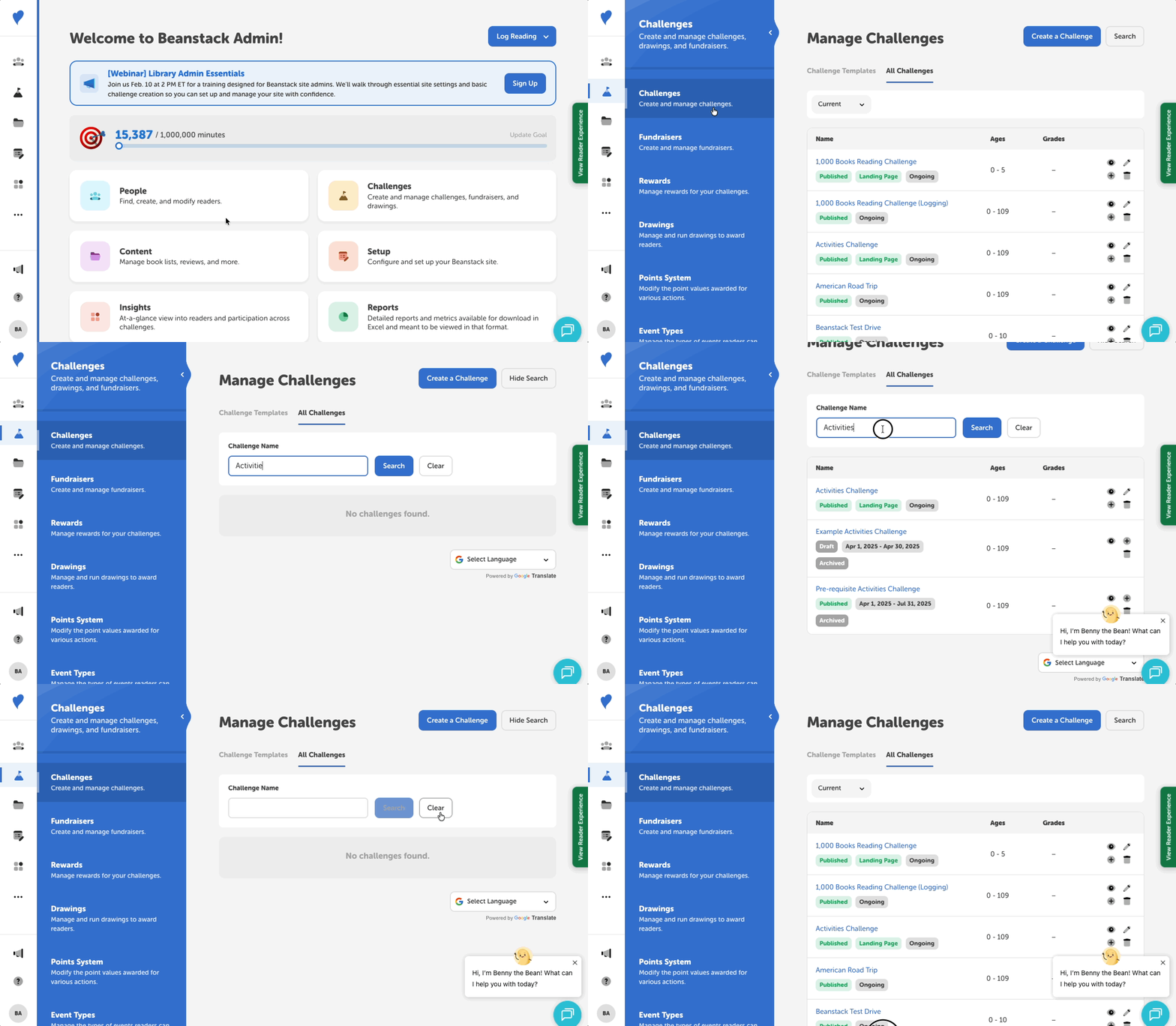
If you have a lot of published, drafted, or archived challenges on your library or school site, here is how to search through all of them and find what you’re looking for more easily:
-
Log in to the admin view of your site.
-
Navigate to Challenges > Challenges (or select “Challenges” from the home dashboard). This takes you to the “Manage Challenges” page.
-
Under the “All Challenges” tab, select “Search” in the upper-right corner of the screen. A textbox will appear.
-
Type at least 3 characters in the textbox and select “Search” again.
-
The search text must match the challenge exactly. For example, searching with “1,000” would match a challenge like “1,000 Books Challenge”. However, searching with “1000” would not.
-
-
Browse through the results of published, drafted, and/or archived challenges.
For any challenge you look up in the “Manage Challenges” page, you can use the quick-action icon buttons to do the following:
-
The eye icon can preview how a challenge looks in the reader view.
-
The pencil icon lets you edit a challenge, but we recommend against editing a published challenge.
-
The plus icon duplicates a challenge and most of its badges and settings.
-
The trash can icon deletes a challenge, and this action cannot be reversed.