

Tags: Libraries, Accounts, Readers, Admins
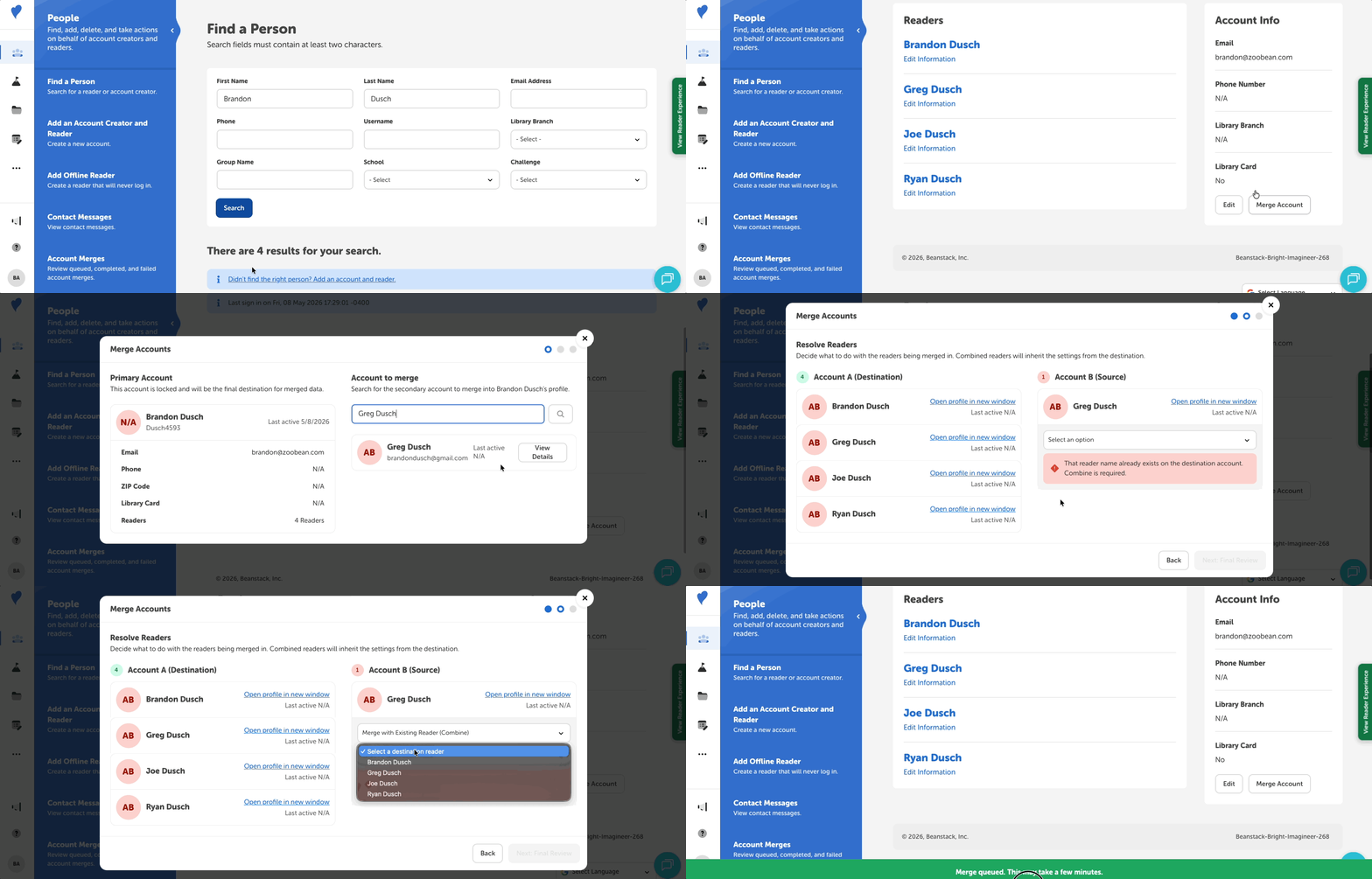
Library admins are able to merge accounts for their readers on their Beanstack site. This allows staff to better handle duplicate account situations caused by readers forgetting their credentials and creating a second account or tandem confusion, thereby saving them time and improving accuracy in their reports.
Note: Merging accounts can be done by site library admins and branch admins, and this action cannot be undone.
Follow the steps below to use this feature (and follow along in this interactive tutorial):
-
Navigate to People and search for an account creator and select their name under the “Account Creator” column.
-
This will be the primary or “destination account” that we’ll merge another account into.
-
-
Click the “Merge Account” button to display a new screen.
-
Under the “Account to merge” header on the right side of the screen, search for another account creator by name, email, or library card number.
-
Click “View Details” on an account to review information such as email and number of readers, followed by “Select Account.”
-
This will be the “source account” whose information we are merging into the “destination account.” Note that this account will be deleted after the merge.
-
-
Resolve any readers by choosing either of the following actions:
-
“Create a New Reader” on the destination account
-
“Merge with Existing Reader (Combine)” - this option combines all reading logs into the destination reader profile
-
-
Select “Next: Final Review.”
-
Review the merge details and select “Confirm & Merge Account,” or select “Back” to return the previous screen and make changes.
-
You’ll be warned that the action is unrecoverable, and re-prompted to “Confirm and Merge.”
-
Merges do not happen instantly and may take a few hours to fully process. Admins are able to track the status and history of account merges under People > Account Merges. They can also use the Potential Duplicate Account Creator report to review a list of accounts with duplicate information.
A few notes about limitations:
-
Only “Patron” role accounts can be merged.
- Logged reading is merged into the destination account; badges are not guarunteed to merge.
- If a reader name from the source account already exists on the destination account, only the “Merge with Existing Reader (Combine)” option is available.
-
Merging is blocked under the following scenarios:
-
The source account contains groups or group readers.
-
The merge results in the destination account exceeding an 8-reader family limit.
-