

We’re always improving Beanstack to enhance your experience. Check here for updates on cutting-edge new features, slick and stylish design updates, and user-friendly improvements to existing features.
What’s Coming...
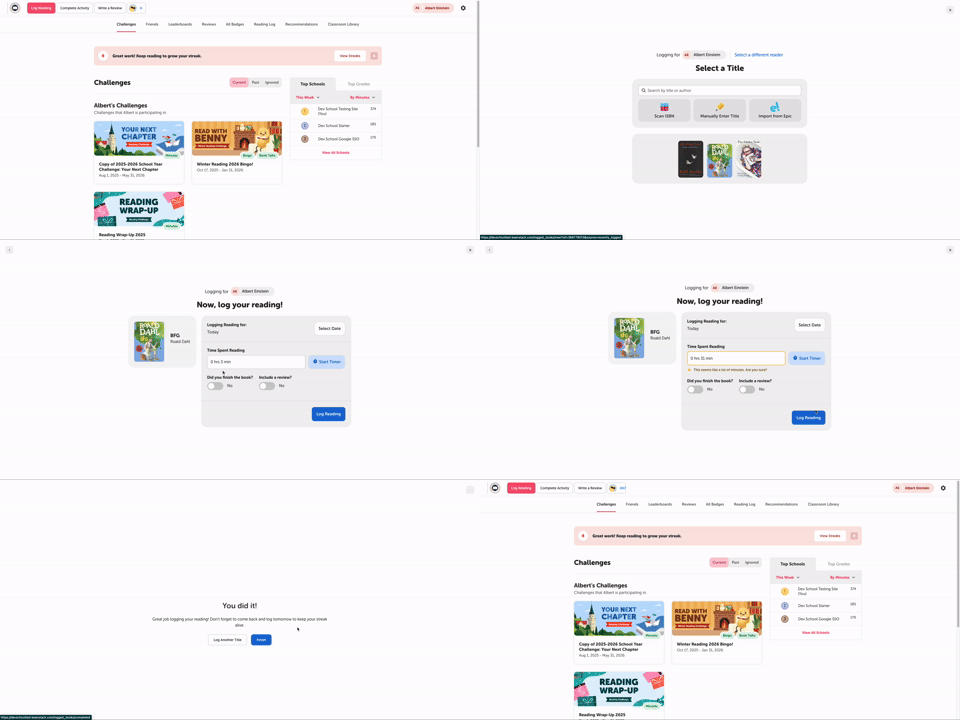
Our new logging experience on web makes it easier than ever for readers of all ages to log their reading in Beanstack. The updated form and modern design will have your readers logging in no time! This streamlined experience reduces the steps needed to log and includes:
-
Usability Improvements: The new form still retains key functionality, like scanning an ISBN or logging with the timer, but it's designed to fit within all standard computer screens, eliminating the need for scrolling.
-
Quick Access to Recent Titles: Readers can select from their 3 most recently logged titles when logging, reducing the time spent searching for their current book.
-
Logging for Multiple Readers: Families with many reader profiles may log for multiple readers at one time.
This new logging experience is available for any library and school site with the setting “Combined Books Logging” enabled. However, if you would like to retain the old logging functionality, simply leave this setting off. To turn this new logging experience on: