

If your school or library uses both Beanstack and Comics Plus, you can now seamlessly connect them! This integration creates a virtuous cycle of engagement: your high-interest comics now fuel your Beanstack reading challenges, driving higher participation rates and deeper community impact.
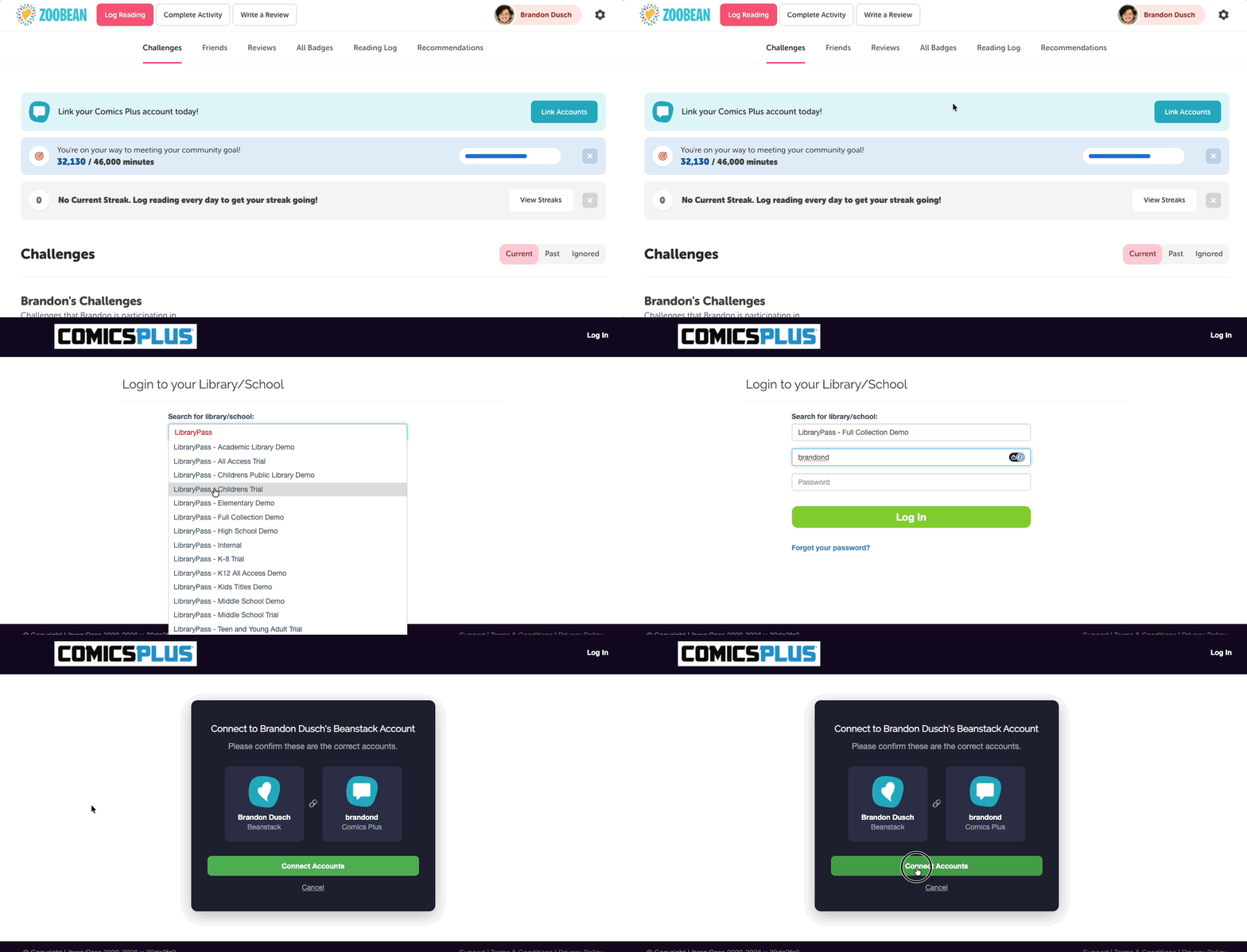
Setting up the integration is quick, seamless, and automated once connected.
-
One-Time Setup: Users link their Beanstack and Comics Plus profiles just once.
-
Real-Time Syncing: All future Comics Plus reading activity automatically syncs to Beanstack from the moment of linking onward (historical data will not backfill).
-
Easy Matching: Users simply select their Comics Plus institution during the initial linking process.
Readers (Beanstack & Comics Plus)
User Experience
Readers (Beanstack & Comics Plus)
Note: Linking and toggling to your Comics Plus account can only be done on the web version of your Beanstack site.
A prominent banner on the “Reading Log” tab will invite readers to link their accounts upon logging in to Beanstack.

Note: Alternatively, you can still link your account by selecting your profile image near the top-right, then “Edit,” then “Connect Account.”
Once linked, a dedicated button appears next to the reader’s profile image and allows them to access their Comics Plus account. This opens a new tab on your browser, that goes to the Comics Plus site.
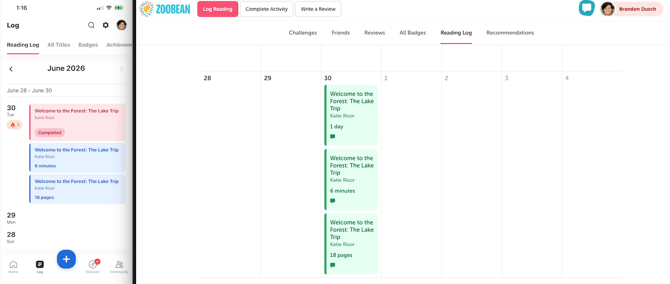
After reading on Comics Plus, the reader’s activity is clearly highlighted with a unique indicator directly within their Beanstack reading logs.
A few notes on reader activity:
- Comics Plus reading is synced with Beanstack every 15 minutes, so readers may not immediately see their Comics Plus reading on Beanstack.
-
The sessions are green on the web version:
Admins (on Beanstack)
Beanstack admins can do the following after their site is integrated with Comics Plus:
-
At-a-Glance Verification: View whether a reader’s account is successfully linked directly from their reader profile in the admin view.
-
Data-Driven Insights: Access a new report under Reports > Participation > General Reports > Comics Plus to track all readers with linked accounts and monitor imported Comics Plus reading data.
FAQs
What reading log types will be imported?
Comics Plus tracks minutes, pages, days, and books completed. Beanstack will import reading for any log type that is active on a microsite (using the same logic for tandemed reader logs). So, e.g. if only minutes and books are active, pages will not be imported.
How will inactivity be handled (e.g. If a reader keeps a page open for a long period of time)?
Only “active” reading will be imported. Periods of inactivity longer than 10 minutes will not be imported. If a user reads 5 pages in 5 minutes and then leaves a page open on their browser for 10 minutes or longer, only 5 pages and 5 minutes will be imported. If, in the same scenario, the reader returns to the book after more than 10 minutes and reads 5 more pages in 5 minutes, the second set of pages and minutes will be imported as a new log in Beanstack.