
Tags: Book Talks with Benny, Schools
Comprehension Book Talks with Benny expands our Book Talks framework to help educators evaluate whether students truly comprehend what they read. Available on Standard, Advanced, and Ultimate plans for schools, this feature uses adaptive questions, book-grounded analysis, and diagnostic flags to give teachers actionable visibility into students' grasp of plot, characters, and themes—all through a fun, low-stakes chat that never feels like a test.
Admin Experience
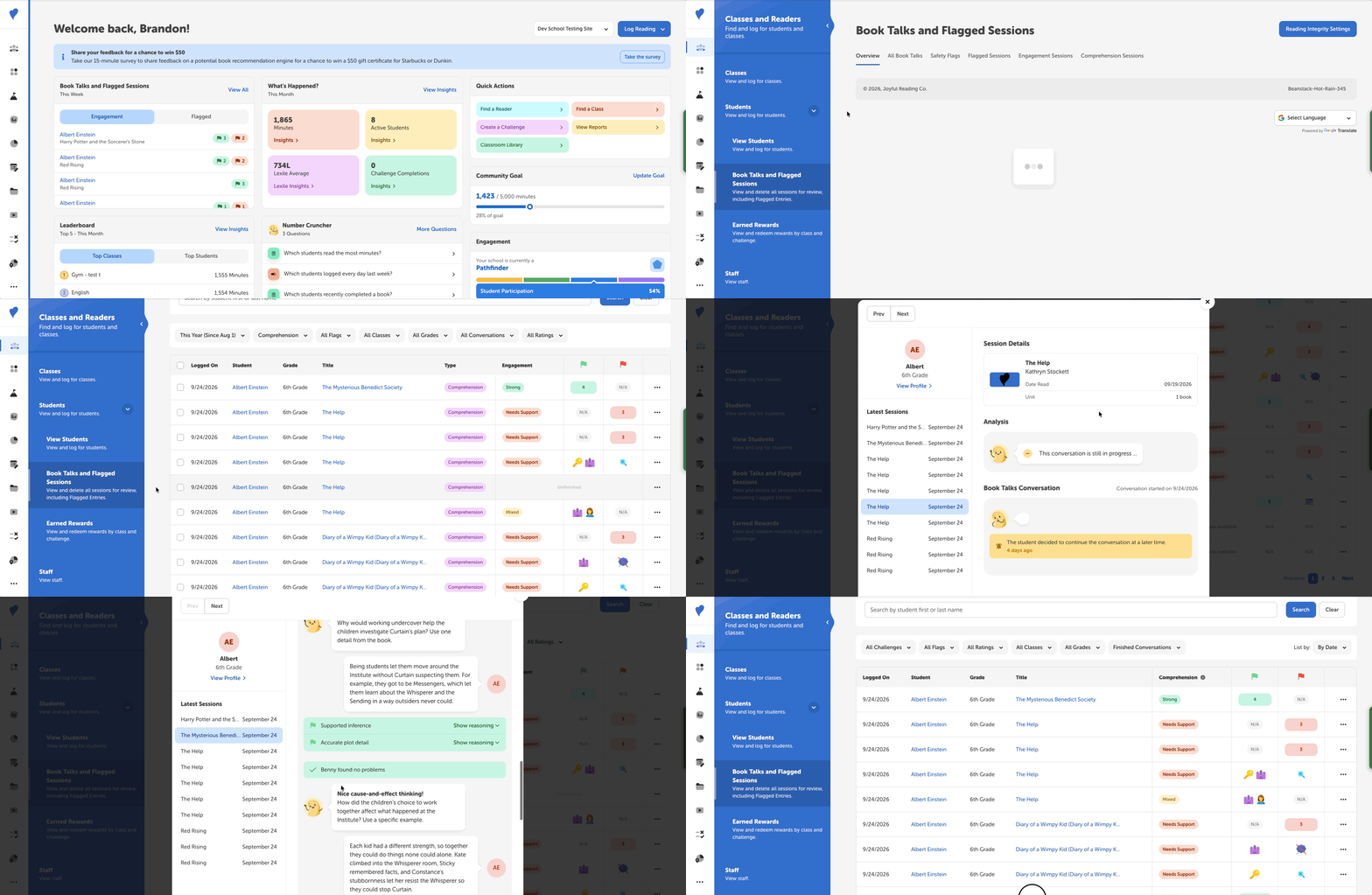
School admins and teachers can view all comprehension talks by doing the following:
-
Log into the admin view of your school site.
-
Navigate to Classes and Readers > Students > Book Talks and Flagged Sessions, or select “View All” from the Book Talks section on your admin dashboard.
-
Go to the “Comprehension Sessions” tab or filter by Comprehension in the dropdown filter of the “All Book Talks” tab.
-
View, edit, or delete sessions by clicking the three-dot option to the right of a student.
Staff can access comprehension talks for:
-
Teachers: Their rostered students
-
Media Specialists: All students at the school
-
Media Specialists Plus: All students at the school, update Book Talks settings.
Click any session to open the Book Talk Review Modal, where you can:
-
Read the full chat transcript alongside an AI-generated summary of the conversation.
-
Review the student's comprehension rating (more below).
-
Inspect specific positive flags (e.g., Text Evidence, Draws Connections) and diagnostic flags (e.g., Inaccurate Character Detail, Unsupported Inference), complete with AI reasoning for each message.
-
Manually adjust ratings and flags if needed.
Comprehension Book Talks use the following ratings for student engagement:
-
🟢 Strong - the student demonstrates a deep understanding of what they’re reading.
-
🟡 Mixed - the student’s understanding of their logged reading contains negative and positive flags.
-
🔴 Needs Support - the student’s understanding of their logged reading requires further support from their teachers.
These ratings are determined by the following engagement flags:
-
Accurate/Inaccurate Key Idea - The student accurately/inaccurately identified a key idea
-
Accurate/Inaccurate Character Detail - The student accurately/inaccurately identified a character detail
-
Accurate/Inaccurate Plot Detail - The student accurately/inaccurately described a plot detail
-
Supported/Unsupported Inference - The student supported/did not support an inference from the text
-
Text Evidence - The student used evidence from the text
-
Draws Connections - The student forms connections between the text and other ideas/materials
Student Experience
Students participate in dynamic, interactive chats with Benny tailored to their grade level and answers. Prompts appear seamlessly after students complete a title, offering a supportive, pressure-free space to reflect on books.
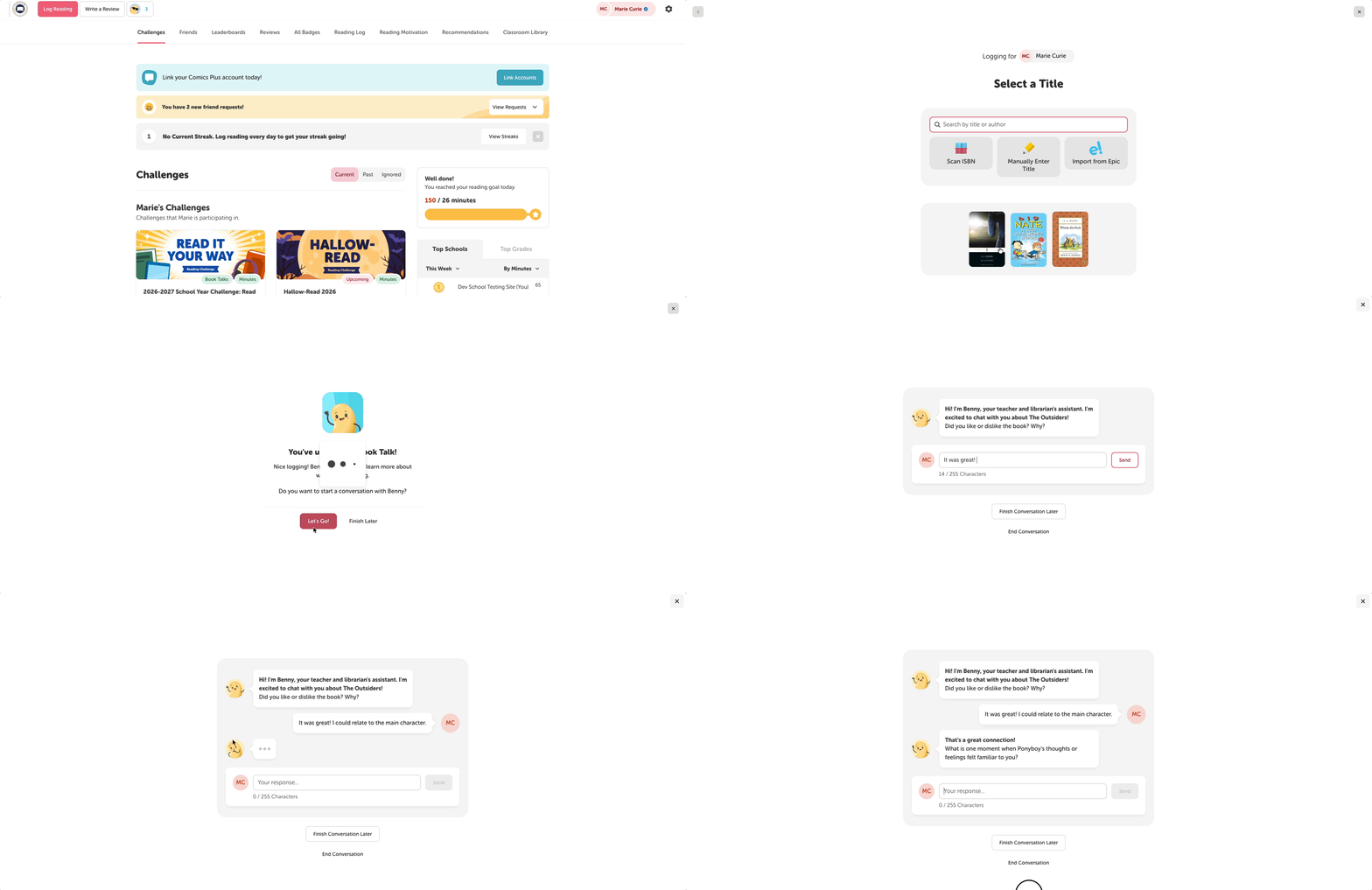
Students will trigger a Comprehension Book Talk if:
-
They are in a grade for which Book Talks is activated least in the lowest grade set by their school for Book Talks.
-
They log a book as complete.
Note: Benny will switch to an Engagement Book Talk if there is not enough context for a specific title.