

Tags: Challenges, Rewards, Certificates, Tickets
Rewards for earned badges are a great way to motivate readers to complete challenges. We encourage libraries and schools to use rewards for physical or digital prizes.
Note: Only library administrators and media specialists plus can create rewards.
-
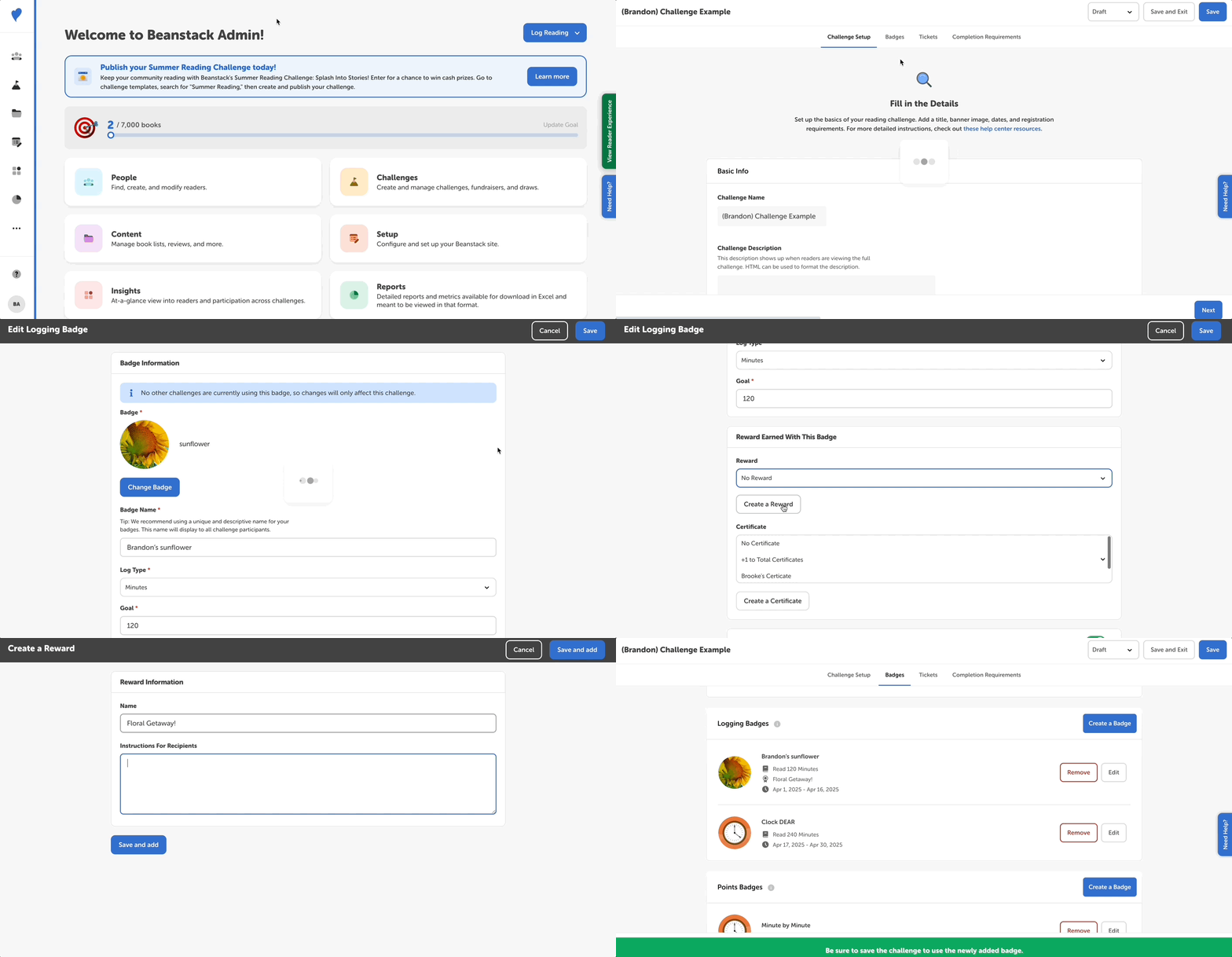
Log into the admin view of your site.
-
Go to Challenges and edit a draft challenge.
-
We recommend against adding rewards to published and/or current challenges since they will not be awarded retroactively.
-
-
Select on the “Badges” tab.
-
Click “Edit” next to the badge you’d like to add a reward for.
-
You can add rewards to any badge type except for repeatable activity badges.
-
-
Under “Reward Earned With This Badge”, do one or both of the following:
-
Use the dropdown menu to add an existing reward. Registration and Completion badges let you add multiple rewards, whereas all other badge types only allow for one.
-
Click “Create Reward” and give the new reward a name and instructions for claiming it. You can use HTML to format the instructions as well as embed images.
-
-
Click “Save.”
And voila! Your challenge badge now has a reward attached to it. After publishing your challenge, enrolled readers will see a “Rewards” tab where they can see the rewards associated with that challenge.
Note: You can also edit rewards. However, it is a best practice to create a new reward for a new challenge since editing an existing reward will affect other challenges the reward is a part of.