Tags: Web, Admins, Mobile App, Logging
Overview
Readers can log full reading sessions on the mobile app, while they log individual units of reading on the web. This means that readers may be able to log some log types on the app that aren’t active on your site. In the mobile app, readers can always track their pages read in a title, input their minutes of reading, and mark books complete, even if your site doesn’t use pages, minutes, or books.
If enrolled in a current challenge or multiple current challenges, readers are required to input a log type from one of those challenges when logging reading on the mobile app. Any log type info that is turned off for the web is only reflected on the mobile app.
Note: Admins should not turn off too many log types for their site, as this can lead to unexpected behavior for logged reading sessions on both web and mobile.
Scanning books
At this time, all mobile app users may scan a title’s ISBN barcode to quickly log their reading. However, for the web version, only users on school sites may use the ISBN scanner.
Example
For instance, consider this scenario:
-
You’ve turned off the days and pages log types for your Beanstack site.
-
A reader on your site is enrolled in minutes and books-logging challenge.
-
They log a reading session on the mobile app for “The Devil in the White City,” where they marked the book as complete and read pages 402 - 446 for 32 minutes on February 2nd.
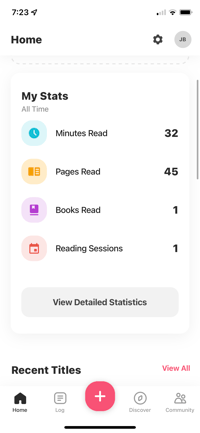
On the mobile app, their reading session will record 1 book completion, 45 pages, 32 minutes, and 1 day:
.jpg?width=200&height=433&name=Mobile%20view%20of%20reading%20sessions%20for%20%E2%80%9CThe%20Devil%20in%20the%20White%20City%E2%80%9D%20(1).jpg)
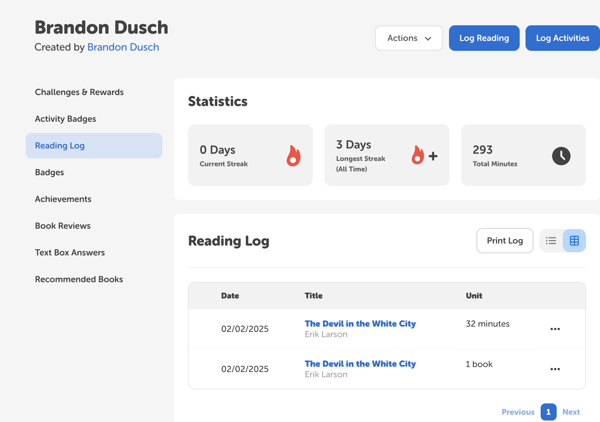
In the reader view on the web version, this is logged as two separate reading sessions on February 2nd: one for a book completion and one for 32 minutes of reading. The page and day information are not reflected since those log types were turned off:This is also reflected in the reader’s profile on the admin view:
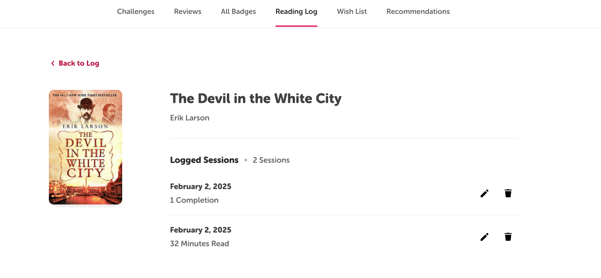
This is also reflected in the reader’s profile on the admin view: