
Review badges reward readers for leaving written or picture book reviews. The reader earns a review badge once they submit the badge’s goal number of reviews. Follow the steps below to create a review badge in your challenge!
-
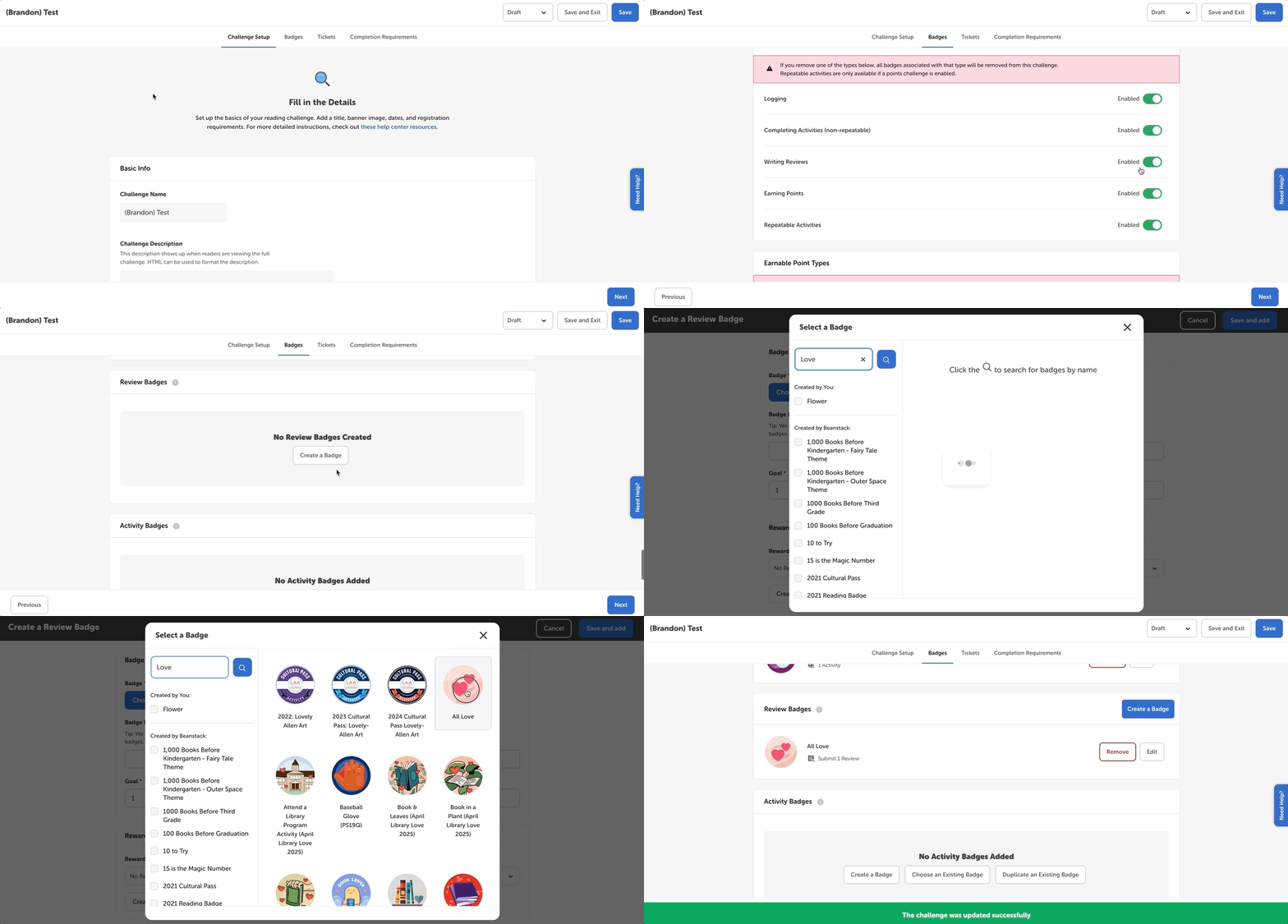
Edit a draft challenge and select the Badges tab.
-
Make sure “Writing Reviews” is enabled as an earnable badge type.
-
Scroll down to the “Review Badges” section and click “Create a Badge.”
-
Click “Choose Badge” to select a badge image from all the badges and badge groups on your site.
-
Give your badge a custom name. More on that in this article.
-
Set your goal.
-
Traditional, non-date restricted review badges are cumulative, which means that each badge’s goal should build on the other badge’s goals, e.g., 1 review, 2 reviews, 5 reviews, etc.
-
For more on time-restricted badges, check out this article.
-
-
Add or create a reward or certificate if you’d like to reward readers when they earn the review badge.
-
Click “Save and Add.”
-
Repeat for additional review badges.