

Tags: RMI, Students
Students in RMI-enabled classes or schools will be able to take a short, fun quiz about their reading habits, and then view their results on the reader view of their school site!
Taking the RMI quiz and viewing the results
Taking the RMI quiz and viewing the results
Here’s how students can get started with the RMI:
-
Log into your school site.
-
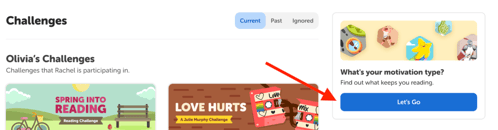
Click the blue “Let’s Go” button on the right side of your home page:
-
If you log your reading, you may be directed to the quiz afterward if your teacher or school set it up to do that.
-
-
Click the blue “Let’s Go” button again to begin a quiz of 20 questions.
-
The options for each question range from “Very different from me” to “A lot like me.”
-
You can pause the quiz at any time and return to it later via step 2.
-
-
After finishing the quiz, your results will show your top 3 Motivation Types as well as reading goal and recommendations. You can now exit by clicking “Close.”
-
Back on your home page, the blue “Let’s Go” button turns into a “View My Results” button where you can return to your RMI results.
-
You can also revisit the results by selecting the “Reading Motivation” tab between “Reading Log” and “Recommendations.”
-